How do I check the time in other cities with a world clock?
Open the world clock above and it shows your own time, time zone and UTC offset at the top, then a card for each city with its local time, weekday, UTC offset and how many hours it is ahead of or behind you. The default cities are New York, London, Paris, Dubai, Karachi, Tokyo, Sydney and Mexico City, and you can add or remove any of them.
On this page
A world clock saves you the mental arithmetic of comparing several places at once. Instead of working out whether London is five or six hours ahead today, you read the difference straight off the card, already adjusted for daylight saving time.
I check it most before a call. One glance tells me who is still at their desk and who is asleep, because night-time cards are shaded. The clock reads everything from your device's clock, so it is as accurate as your own computer. If you only need your own time in big digits, the online clock does that, and the flip clock does it with split-flap cards.
How to use the world clock
The world clock works the moment the page opens: it detects your local time automatically and shows the current time for a set of major cities in different countries. Your own time ticks every second, and the city cards stay in step with it, showing hours and minutes.
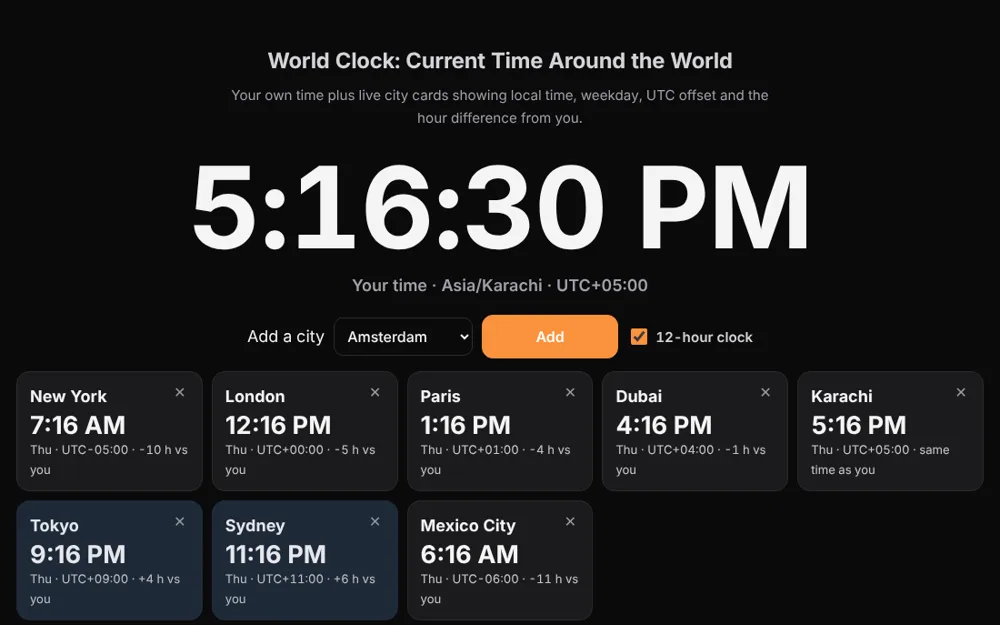
- Read: check each card for local time, weekday, UTC offset and the hour difference from you.
- Add: choose a city from the list of 40+ cities to add a new card.
- Remove: press the × on any card you do not need.
- Format: switch the 12-hour toggle on for AM/PM, or off for 24-hour time.
The 12-hour setting and your city list are remembered in your browser, so the page opens with your own layout next time. Shaded cards show the day/night split: a dark card means it is night in that city.
Worked example: default cities, 12-hour toggle on, then add Singapore and remove Mexico City. Result: eight cards, with Singapore showing its local time, weekday, UTC offset and hour difference from you, and the Mexico City card gone; the next visit opens with the same set.
How do UTC offsets work?
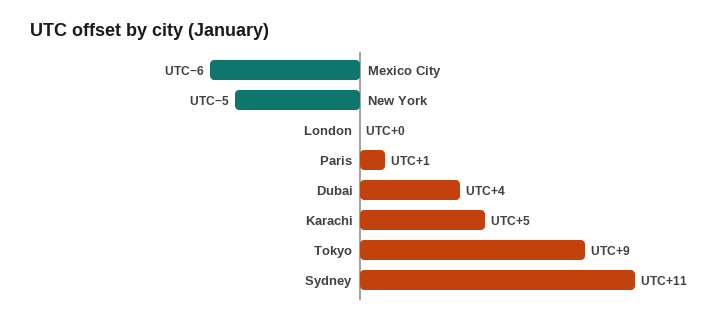
A UTC offset is the number of hours and minutes a place is ahead of or behind Coordinated Universal Time, the world's time standard. London in winter is UTC+0, Paris is UTC+1 (Central European Time), and New York in winter is UTC-5 (Eastern Standard Time).
Most of the more than 38 offsets in use are whole hours, but not all. A day has 24 hours, yet some zones sit on the half-hour or even a 45-minute mark, as India does at half past. These examples show the spread:
| Place | Time zone | Offset from UTC |
|---|---|---|
| New York (winter) | Eastern Standard Time | UTC-5 |
| Paris (winter) | Central European Time | UTC+1 |
| India | India Standard Time | UTC+5:30 |
| Nepal | Nepal Time | UTC+5:45 |
| Newfoundland (winter) | Newfoundland Standard Time | UTC-3:30 |
Offsets change when a place moves to daylight saving time, so a card that reads UTC-5 in January can read UTC-4 in July. The world clock shows the current offset on every card, so you never have to calculate differences from memory.
Which city combinations help remote teams?
The most useful city combinations are the ones that match where your colleagues, clients or family actually are, so start by adding those cities first. A few combinations come up again and again when people plan calls and meetings:
- Finance: New York, London and Tokyo cover the big trading hubs across three continents.
- Software teams: a US west-coast city such as Los Angeles, London and an Indian city such as Mumbai cover a common development split.
- Gulf and Asia: Dubai, Singapore and Sydney cover much of the region in one row.
- Family: your home city plus wherever relatives live, so you can message contacts abroad at a decent hour.
For travel, add your destination a week before you leave and watch the gap. Think about business hours too: an office open 9:00 to 18:00 local time may be closed on a local holiday, which no clock shows.
A call at 9:00 in New York lands at 14:00 in London in winter, and weekends fall on Friday and Saturday in parts of the Middle East, so check the weekday on each card and keep work and family cities on one screen rather than separate boards.
How does the world clock keep accurate time?
The world clock keeps accurate time by reading your device's clock plus its time zone setting and working out each city's local time from the time zone rules built into your browser. Nothing is downloaded from a time server; the cards refresh every second from your own clock.
Those rules come from the time zone data that browsers ship with, the same IANA database most operating systems use, so daylight saving changes are built in. When a city moves its clocks, its card changes on the right date without any update to the page.
That also means accuracy depends on your device. If your clock or time zone is wrong, every card is wrong by the same amount, so turn on automatic time in your system settings. If one city looks off by an hour, check that the change has not just happened in that region.
Need a different tool? Browse all clocks.
Frequently asked questions
What exactly is a world clock?
In short, a world clock is a tool that shows the current time in several cities around the world on one screen, adjusted for each city's time zone and daylight saving time. This one starts with eight cities across North America, Europe, Asia and Australia, and you can add others from the list of 40+ cities. It is free, needs no account and works in any modern browser.
Where does the world clock get my local time from?
The world clock gets your local time by reading your device's clock and time zone, which the browser shares with the page. It shows your time zone name and UTC offset at the top, so you can confirm the page has the right zone. The browser converts every other city using the IANA time zone database.
Does the world clock handle daylight saving time?
Yes, the world clock adjusts for daylight saving time automatically, using the rules built into your browser. Each card's offset and hour difference change on the right date for that city. Daylight saving transitions are where manual math goes wrong, so this is the main reason to use a world clock.
How many time zones does the world have?
The world has more time zones than hours in a day: a day has 24 hours, but over 38 different local offsets are used. Most are whole hours from UTC, but some are unusual. IST is UTC+5:30, Nepal uses UTC+5:45, and Newfoundland runs on UTC-3:30 in winter. On the US east coast, EST is UTC-5. Those offsets are why a simple "add five hours" rule often fails.
What is UTC?
UTC, or Coordinated Universal Time, is the global reference time from which every time zone is measured as an offset. UTC itself never changes for daylight saving, unlike Europe and North America, which switch their clocks on different dates. That gap of a week or two each spring and autumn is when transatlantic meeting times shift unexpectedly.
How do I add a city to the world clock?
To add a city, pick it from the add-city list of 40+ cities, and a new card appears straight away. The list covers the major cities most people need. To remove a card, press its × button; each card already shows its UTC offset.
Can I group cities into boards?
No, the world clock has one set of cities rather than separate boards, so keep the list short and relevant. If you follow finance hubs for work and have family in Los Angeles, Mumbai, Dubai or Singapore, mix them on one screen; Asia-Pacific cities line up well side by side. Your set is saved locally in the browser.
Does the world clock show business hours?
No, the world clock does not mark cities as open or closed or factor in holidays, but the shaded night cards and the weekday on each card cover the basics. A typical office day of 9:00 to 18:00 is easy to spot by reading the local time; a shaded card simply means it is night there.
Can I change the time and date format?
Yes, the 12-hour toggle switches every card between AM/PM and 24-hour time, acting as the format toggle for the whole page. The city cards show hours and minutes, and the weekday appears in your browser's language. Your format choice is remembered for next time.
Can I embed the world clock on my website?
Yes, the "Embed this tool on your website" box under the clock gives you copyable iframe code to place the world clock on your own website, along with a credit link. It also works well open in its own tab next to your calendar. It shows current times rather than converting a specific meeting time.
Does the world clock show sunrise and sunset?
No, the world clock does not show sunrise or sunset times, but night-time cards are shaded so you can see at a glance where it is dark. For a New Year countdown, use the countdown timer.
Does my world clock save my cities?
Yes, the world clock saves your cities and 12-hour setting in your browser's localStorage, so your layout persists across sessions on the same device. Nothing goes to a server, and there is no account. The settings live on one device, so a team that wants the same cities everywhere sets them up once on each computer.