What does a countdown timer to a date show?
A countdown timer shows the days, hours, minutes and seconds left until a date and time you choose, updates every second, and rings when that moment arrives.
On this page
- How to use the countdown timer
- How does the countdown timer keep accurate time?
- Which events can you count down to?
- How can you share or display a countdown?
- Why does a visible countdown make a deadline easier to act on?
- Can a countdown timer also time 25 minutes of work?
- What happens with time zones when you share a countdown?
You give it an event name and a moment in your local time, and the page works out the difference between now and then. Under the hood it is clock subtraction that borrows in units of 60, the same way you would carry minutes into hours on paper, only done for you every second.
The countdown starts immediately once the date is set, and a bell alarm plays when it reaches zero. No add-to-calendar step is needed to see it; the page itself is the reminder.
A number like "29 days" for Christmas or "11 weeks" until a run of family birthdays turns a vague "soon" into something you can plan around. In my experience that number is what prompts action: booking the train, ordering the cake, starting the revision.
How to use the countdown timer
The countdown timer needs only a name and a moment; the rest happens on its own. Follow these steps:
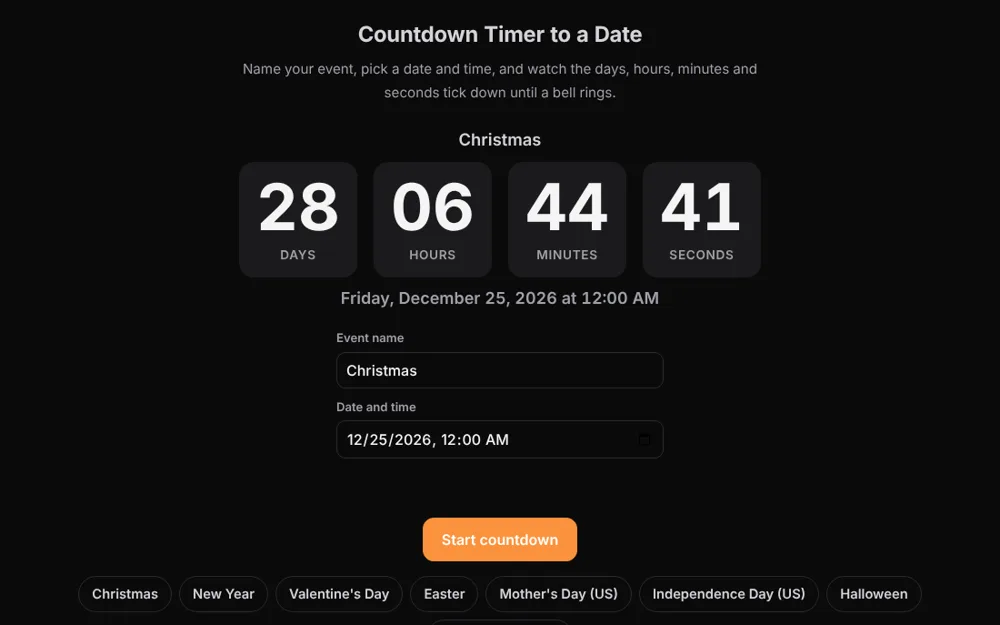
- Name it: Type an event name, such as "Ana's 30th".
- Pick the moment: Choose a future date and time in your local time. A moment that has already passed shows an error.
- Or tap an event: Use an upcoming-event button such as Christmas, New Year or Valentine's Day to fill in the date for you.
- Watch or share: Leave it running, press Full screen to fill the screen, or use Copy countdown link.
Worked example: on Wednesday, November 25, 2026 at 3:00 PM, set "Ana's 30th" for Saturday, February 20, 2027 at 3:00 PM. The display reads 87 days, 0 hours, 0 minutes, 0 seconds, along with the full date, and a second later it shows 86 days, 23 hours, 59 minutes, 59 seconds.
How does the countdown timer keep accurate time?
The countdown timer keeps accurate time by subtracting the present moment, read from your device clock, from the target moment you scheduled, then splitting the result into days, hours, minutes and seconds. Because it recomputes from the clock each time, the figure stays live even after the computer wakes up.
Here is what that looks like from one fixed starting point, noon on Wednesday, November 25, 2026:
| Event | Event moment | Time left |
|---|---|---|
| Christmas | Dec 25, 2026, 12:00 AM | 29 days, 12 hours |
| New Year | Jan 1, 2027, 12:00 AM | 36 days, 12 hours |
| Valentine's Day | Feb 14, 2027, 12:00 AM | 80 days, 12 hours |
Events more than a year away simply keep counting in days. The set moment never moves, the time left also shows in the browser tab, and nothing goes to a server.
Which events can you count down to?
You can count down to any event with a fixed date and time, from a holiday to a personal deadline that matters only to you. The preset event buttons cover the big shared dates, and anything else is a name and a date away.
Calendar quirks are where a browser-based countdown earns its keep. Months have different lengths, and leap years add an extra day (the next February 29 falls in 2028), so counting "three months" by hand is easy to get wrong.
I like a concrete countdown for things that sneak up: a passport renewal, a lease ending, a course start. Choose the site theme you find easiest to read, give the event a clear name, and leave the tab pinned where you will see it.
How can you share or display a countdown?
You can share a countdown by pressing Copy countdown link and sending that link, which reopens the same event and moment for whoever clicks it. For deadlines at work, product launches, sporting events or weddings, one link in a group chat saves everyone setting up their own.
To display it, press Full screen and the tiles of digits grow to the size of the screen. That suits a lobby display, a classroom wall or a party where the title of the event and a big font need to be readable from across the room.
Leaving is just as quick: Esc, the browser's own exit key, closes full screen without a mouse. A date countdown has nothing to pause, so you can leave the page on a spare screen without touching it again.
Why does a visible countdown make a deadline easier to act on?
A visible countdown makes a deadline easier to act on because it turns a date into a shrinking number, which makes the remaining time harder to ignore. The Pomodoro method, developed by Francesco Cirillo, applies the same pressure at a small scale, and our pomodoro timer runs it for you: 25-minute work blocks, 5-minute breaks, and a longer rest after four sessions.
Long-range countdowns do it over weeks. Time-boxing gives each task a fixed budget, which helps limit perfectionism, creates review points, and makes daily schedules more realistic.
My own trick is to split a big countdown into checkpoints. If a report is due in 30 days, I write down what should be done at 20 and at 10 days left, so the countdown becomes a set duration for each chunk instead of one looming date.
Can a countdown timer also time 25 minutes of work?
This countdown timer counts to a calendar date, so for a 25-minute work block you should use the online timer, which counts down a length you type. The two answer different questions: "when is it?" versus "how long do I keep going?"
A visible deadline in days keeps attention on the big picture, such as exams at the end of the school year, fitness goals or quarterly business targets. A short timer handles the starting problem: it is easier to begin when the block is small, and it cuts down mind-wandering.
Use both together. Start small with one timed block today, check the date countdown for context, and take the break without guilt when the timer rings.
What happens with time zones when you share a countdown?
The countdown uses the local time of the device it runs on, so when you share it with someone in another time zone, say which zone you meant in your message. This matters most for trips, vacations and online events where people join from different places.
Family holidays are usually local, so a Thanksgiving or Halloween countdown rarely causes confusion. A product drop or a livestream for a global audience is different: name the zone in the event, for example "Launch 9:00 AM New York".
Checking the current date and time on your own device first avoids most mistakes. To compare the hour in other cities before you pick a moment, open the world clock. You can also copy the iframe code from the "Embed this tool on your website" box to show the countdown on your own site.
Need a different tool? Browse all timers & stopwatch.
Frequently asked questions
Is the countdown timer free?
Yes, the countdown timer is free, with nothing to sign up for. It stays simple: a link that opens the event preloaded and a Full screen button.
The digits scale up for TVs and desk displays, and you only pick the date once.
What happens when the countdown reaches the date?
When the countdown reaches the date, the timer reaches zero and rings a bell, so keep the tab open and the sound on if you want to hear it. The display refreshes once per second right up to that point.
For yearly dates such as an anniversary or a retirement party, set the next occurrence again afterwards. For baby due dates, send the shareable link to family so every viewer sees the same moment.
Can you count down from a date that has already passed?
No, the countdown cannot start from a date that has already passed: a past event gives an error, because the tool only counts toward a future moment.
It uses your device's time zone, so for a past date, simply set the next one you care about.