How do I set a 25 minute timer?
To set a 25 minute timer, press the 25 min preset above (or type 0 hours, 25 minutes, 0 seconds and press Start), and an alarm rings the moment the countdown reaches zero. Nothing else is required, and the end time is accurate to the second because it comes from your device clock.
On this page
- How to use the 25 minute timer
- What can you get done in 25 minutes?
- Why is the Pomodoro session 25 minutes long?
- What features does the 25 minute timer include?
- Does a 25 minute desk session burn calories?
- When is a 25 minute block the wrong choice?
- How long is 25 minutes in seconds and milliseconds?
- How does the 25 minute timer keep accurate time?
Twenty-five minutes looks like an arbitrary number until you notice how many jobs it fits. It covers one timed exam practice section, a full workout circuit, a deck of flashcards or a few pages of a novel. It also runs about as long as a half-hour TV slot once the commercials are cut.
The number itself comes from the method Francesco Cirillo built in the late 1980s around a tomato-shaped kitchen timer. That history explains why so many people type "25 minute timer" instead of 20 or 30: the length has become shorthand for one honest round of work.
How to use the 25 minute timer
The 25 minute timer starts with one press of its preset button, and it is free: no sign-up, no install and no account, just a page in your browser. Times are typed as hours, minutes and seconds, whole numbers only, up to 99:59:59; the display shows the preset as 25:00.
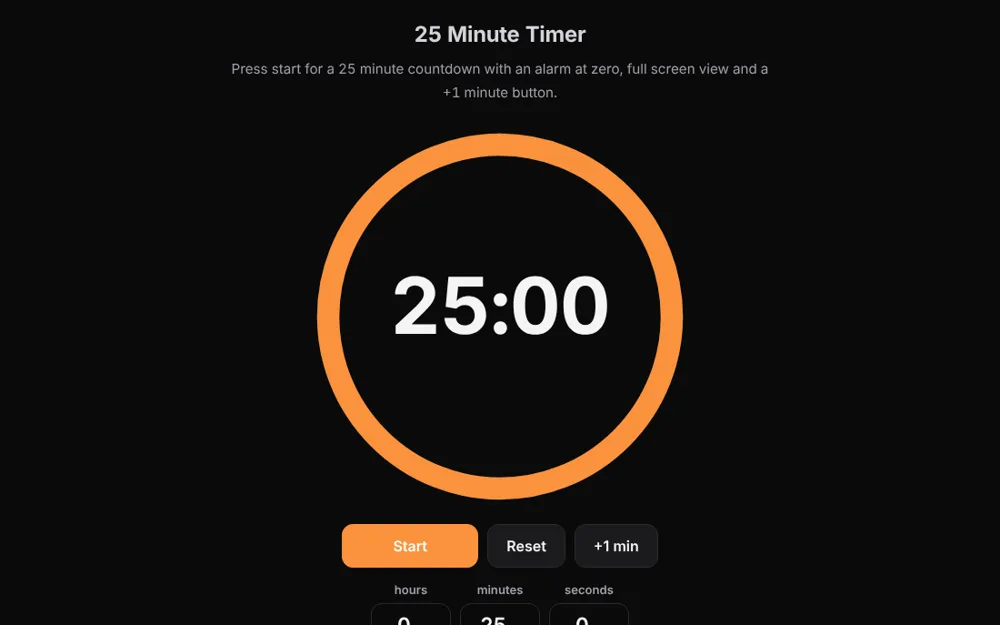
- Start: press the 25 min preset (one click starts it) or type the time and press Start.
- Pause: press Pause; the button changes to Resume and the clock continues from the same second.
- +1 min: adds a minute, even while running, for the moment you are one sentence from done.
- Reset: returns the clock to the time you set, ready for the next round.
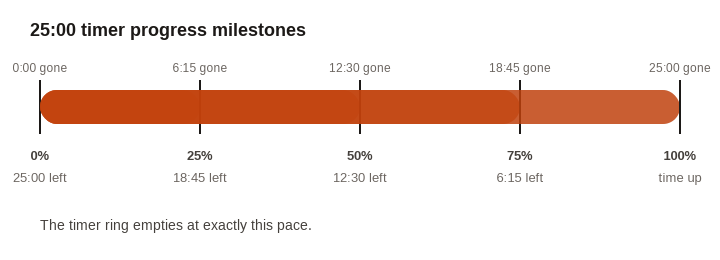
Before the first round, choose a sound (Beep, Chime, Digital, Soft or Bell), set the volume and press Test sound. The progress ring lets you check the state of the clock at a glance, and in fullscreen the digits are big enough to read across a room, which is useful in classrooms during transitions or between workouts when people are moving.
Worked example: preset 25 min, sound Chime, Repeat when finished on. Result: at 0:00 the "Time's up!" banner appears with Stop alarm and Restart, the alarm plays, and three seconds later a fresh 25:00 round starts by itself. I use that setup for exercise intervals with short rest periods, with my phone set aside so the only thing I look at is the ring.
The full screen view is distraction-free, and your sound and volume are remembered for next time; the theme button in the site header switches between light and dark.
What can you get done in 25 minutes?
Twenty-five minutes is enough for one complete, self-contained piece of work, as long as you choose a task that fits rather than one you will abandon halfway. The length was meant as a Pomodoro work session, but in daily use it doubles as a focus block for deep work, a stretch of cooking, or one chapter of reading. These are the jobs I time most often:
- Writing: one rough draft of a blog section or cover letter, edited in a later round.
- Admin: a batch of administrative work, invoicing or reviewing pull requests.
- Research: one focused research pass on a single question, notes only.
- Teamwork: a short collaborative check-in with a hard stop.
Families use the same block differently. A sitcom episode with the ads skipped runs close to 25 minutes, so the timer is a fair way to cap screen time for young children. The ending is not a surprise, because the ring has been shrinking the whole time.
What makes the block work is that it is manageable. Starting 25 minutes of anything feels cheap, and a fixed endpoint turns vague effort into sustained concentration. Many people find it easier to stay on task when the finish is visible.
Why is the Pomodoro session 25 minutes long?
The Pomodoro session is 25 minutes because that is the length Francesco Cirillo built the method around in the late 1980s, using a tomato-shaped kitchen timer. Sources I found describe it as a practical default rather than a lab result, which is worth knowing before you treat the number as sacred.
The method wraps the block in simple rules: pick one task, work until the bell, step away, take a break, repeat. Short rounds can suit complex tasks, because each round ends with a short recovery before the next push.
Timeboxing is the real engine. Productivity comes less from the minutes than from the edge: the task shrinks to fit the box. I have no neuroscience to cite for why that works for cognitive work; it is a personal observation.
The length is a default, not a law. Work that needs longer blocks of uninterrupted thinking may suit 50 minutes better, and a timer can only shape attention, never the size of your workload.
What features does the 25 minute timer include?
Beyond the countdown itself, this page offers full screen, five alarm sounds with a volume slider and a screen wake lock where the browser supports it. Keyboard shortcuts: Space starts and pauses, R resets, F opens full screen, + adds a minute and Esc stops the alarm.
In gyms or presentations, the live timer in full screen reads as large text on a high-contrast background; the browser's F11 works too, but F is faster. The page keeps the screen awake while it runs, which matters on mobile, where some browsers suspend a page when the screen locks. Keep the volume up on phones.
A Test sound button lets you check the volume first, and desktop notifications are optional. I note the task on paper before starting. For a ready-made study cycle, the pomodoro timer adds focus, short-break and long-break tabs with a task list, and the aesthetic timer wraps the same cycle in scenes such as Forest or Sunset.
Does a 25 minute desk session burn calories?
A 25 minute session at a desk burns very little energy, so the health value of the timer lies in the breaks it creates, not in the sitting. Standing up when the alarm rings is the easy win: a short walk, a minute of stretching, or a set of jumping jacks counts as light exercise.
The screen is the other thing to rest. Give your eyes a rest from the screen, and leave social media closed, because scrolling feels like a break but keeps your eyes and attention on a phone.
After four rounds, a long break of 15–30 minutes is the usual pattern. That is a good slot for lunch, a walk outside or a household job that gets you on your feet.
When is a 25 minute block the wrong choice?
A 25 minute block is the wrong choice when the work keeps getting broken up or needs far more than half an hour to warm up. An interrupted round has to be restarted under the original rules, so constant distractions make the method feel like failure rather than help.
The hidden cost is reloading context. Switching tasks every 25 minutes is fine for email batching or quick admin, but painful for a problem you only just loaded into your head. If you are deep in a hard bug or a long argument, add a minute with +1 min or let the round run long.
If 25 minutes is too long for a task, the 15 minute timer is the next step down, and the 30 minute timer gives you a longer round. Size matters too. A round fits a rough draft, not a 3,000-word report, so splitting big jobs into round-sized pieces is part of the skill. I aim for about 500 words per round when drafting and accept that some rounds produce less.
How long is 25 minutes in seconds and milliseconds?
Twenty-five minutes is 1,500 seconds, or 1,500,000 milliseconds, which is about 41.7% of an hour. Under the hood, the timer compares those values against the device's internal clock, and the display refreshes from that comparison in plain JavaScript.
| Unit | 25 minutes equals |
|---|---|
| Seconds | 1,500 |
| Milliseconds | 1,500,000 |
| Share of an hour | about 41.7% |
| Four rounds of focus | 100 minutes |
| Four rounds plus three 5-minute breaks | 115 minutes |
The last row is the one I plan days around: a full set of four rounds takes just under two hours before the long break. Seen that way, a morning holds two sets, with a coffee in between, and an afternoon fits a third set before the end of the workday.
How does the 25 minute timer keep accurate time?
The 25 minute timer keeps accurate time by fixing the end moment as start time plus 25 minutes and checking it against your device clock four times a second. Because the end moment never moves, the countdown cannot drift, even if the computer is busy.
This matters in the background. When you move to another tab the browser throttles animations, yet the end check carries on, so the alarm fires at the right moment. A glance at the tab title also shows the time left.
Because the timer reads the clock rather than counting ticks, it stays reliable for focus work, cooking and lessons on any modern browser.
Need a different tool? Browse all timers & stopwatch.
Frequently asked questions
Will the 25 minute timer keep running if I switch tabs?
Yes, the 25 minute timer keeps running in a background tab and still rings at 0:00. Only closing the tab stops it. The running state is not saved, so keep the tab open while you work in other windows.
What happens if I close the browser tab mid-countdown?
Closing the browser tab ends the countdown, because the timer lives inside the open page. Your sound and volume choices stay saved, but the running countdown is not restored. For anything critical, such as medication or lab timing, use dedicated hardware that cannot be closed by accident. Nothing is sent to a server, so no private timer data leaves the page.
Is my timer data private?
Yes, the timer keeps everything on your device: settings sit in your browser's local storage, and nothing is uploaded or tied to an account. You can clear them at any time by clearing site data for this page.
Is there science behind 25 minute focus blocks?
There is research on attention, but no study shows that exactly 25 minutes is the ideal focus length. Claims that attention peaks somewhere between 20 and 30 minutes circulate on timer sites without a named study. Some learning researchers are quoted as recommending 25–30 minutes of study before a pause, which fits the Pomodoro default, but treat the exact figure as a convention.
Is a 25 minute timer good for studying?
Yes, a 25 minute timer is good for studying because one round is long enough for a focused pass of self-testing and short enough to restart after a break. Timer sites suggest 8–12 Pomodoros a day, about 3.5–5 hours, without naming a study, so treat that as a rule of thumb. Beginners often start with 4–6 sessions.
What should I do during the 5 minute break?
During the 5 minute break, get up and move, then come back before the next round starts. Movement breaks matter more than any number of calories burned in a desk session; figures like 45–60 kcal per session appear online without a source, so I ignore them. Staying off screens during the break makes it a real rest. After four intervals, take a longer break.
How many 25 minute rounds fit in one workday?
A realistic day holds between 4 and 12 sessions of 25 minutes, depending on the work and how many interruptions they face. Meeting-heavy calendars leave few open slots, and reactive roles such as customer support or on-call engineering depend on responsiveness. Team work with a shared rhythm rarely fits one person's timer. For scale, 8 sessions is 200 minutes, about 3 hours 20 minutes.
Can the 25 minute timer run in full screen?
Yes, the 25 minute timer runs in full screen when you press the Full screen button or the F key. The digits and ring fill the display, readable from the back of a room, and the page keeps the screen awake. Press F again to leave it.
Does the 25 minute timer have an alarm at the end?
Yes, the 25 minute timer ends with an audio alarm in the sound you picked: Beep, Chime, Digital, Soft or Bell. The sound repeats for up to 60 seconds while the "Time's up!" banner shows. Dragging the volume slider to zero mutes it, which acts as a sound toggle when only the visual completion alerts matter.
Can I pause the 25 minute timer and resume later?
Yes, you can pause the 25 minute timer at any second with the Pause button or the Space key, then resume from exactly where it stopped; the clock resumes without losing a second. Reset sets it back to the original duration. To dismiss the audio alarm early, press Stop alarm or Esc, and use the banner's Restart for another round.