What is an aesthetic timer, and how do you use one?
An aesthetic timer is a focus timer designed to look calm and pleasant on screen, with soft colours, a scene behind the clock and a smooth progress ring, so you are happy to leave it visible while you study or work. You choose a scene, set a focus length, press Start, and the timer runs pomodoro-style blocks with breaks.
On this page
- What makes a timer look and feel aesthetic?
- How to use the Aesthetic Timer
- Which aesthetic timer style works best for studying?
- Why do calm scenes and soft sound help you focus?
- Should an aesthetic pomodoro timer run 25/5 or 50/10?
- What does a calm study session look like from start to finish?
- How can I make the timer feel like my own?
- How does the Aesthetic Timer keep accurate time?
The aesthetic timer on this page is a full pomodoro timer dressed in six scenes: Sunset, Forest, Ocean, Lavender, Night and Café. Each scene changes the colours and background of the timer, and the same Focus, Short break and Long break tabs work underneath, which makes it an aesthetic pomodoro timer and a cute timer in one.
My own reason for using one is simple. Compared with harsh white screens and a ticking clock, a calm, distraction-free screen in a chosen atmosphere is something I will keep in view for three hours of deep work, and a timer you actually keep in view is the one that keeps you on task.
What makes a timer look and feel aesthetic?
A timer feels aesthetic when its design calms the eye instead of alarming it: gentle colour palettes, a scene or gradient behind the clock, a smooth ring that shows time draining, and quiet sounds. The goal is tranquil minimalism, the opposite of a clinical lab timer with sharp beeps.
Environmental psychologists Stephen and Rachel Kaplan used the term soft fascination for scenery that holds attention without mental strain, and that is the feeling a well-made study clock combines with its countdown.
The difference shows most in long sessions. Plain digits on a stark screen are fine for a 60-second task, but stare at them for an afternoon and they start to feel like a deadline. A calming palette changes the mood of the same countdown, even though the maths is identical.
Aesthetic does not mean busy, and if you want even less on screen, the minimalist timer strips the design back further. I would rather have one quiet scene than a dozen animated effects, because motion pulls the eye. A good aesthetic timer still answers the only question that matters at a glance: how much focus time is left?
How to use the Aesthetic Timer
The Aesthetic Timer is free, runs in your browser with no sign-up, and setting it up takes a few clicks:
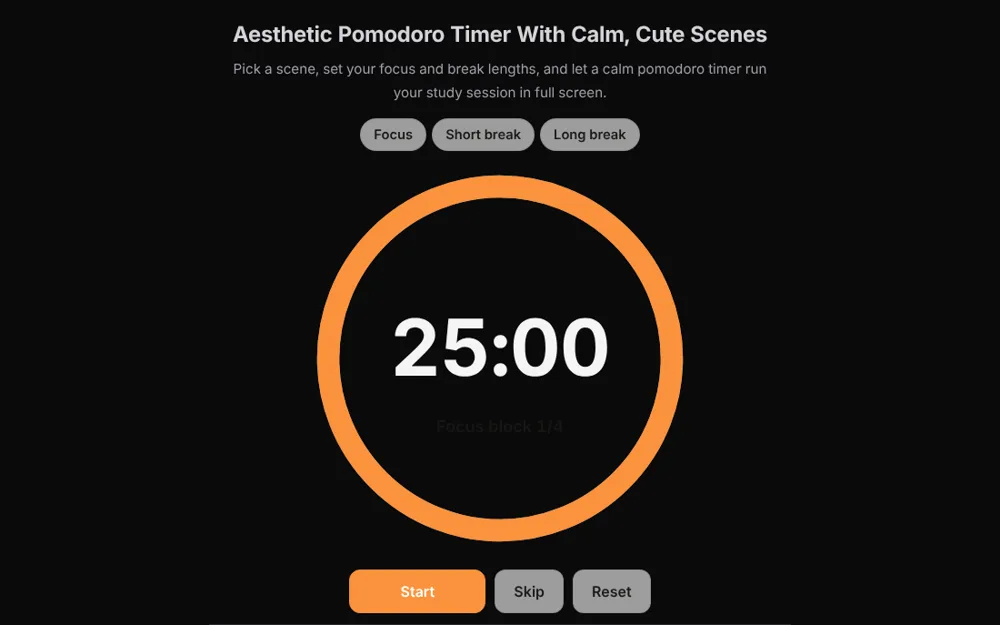
- Pick a scene from the Scene menu in the options: Sunset, Forest, Ocean, Lavender, Night or Café. The colours and background of the timer change straight away.
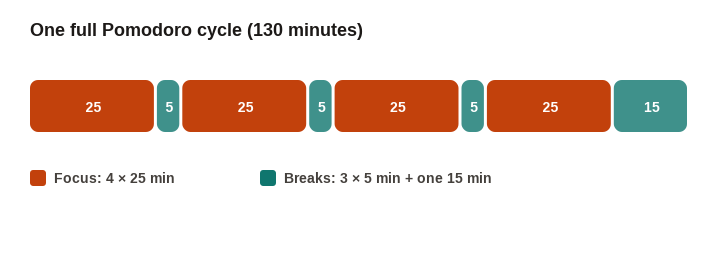
- Check the lengths on the Focus, Short break and Long break tabs (defaults 25, 5 and 15 minutes, with a long break after every 4 focus blocks), and edit them if you like.
- Type the task into the task list so the block has a clear intention and a task label you can tick off later; specific goals such as "20 practice questions" start more easily than vague ones.
- Press Start or Space. The label shows progress, for example "Focus block 2/4", and a sound plays when each block ends. After four cycles the long break arrives on its own.
Worked example: choose the Forest scene, set Focus to 50, Short break to 10, Long break to 20 and blocks to 3, and leave Start the next block automatically on. Result: three 50-minute focus blocks, two 10-minute short breaks and one 20-minute long break, a session of 3 hours 10 minutes (150 + 20 + 20 minutes).
Keyboard shortcuts keep the screen clean: Space starts or pauses, N skips, R resets and F switches to full screen, which suits a second screen or a responsive tablet propped beside the laptop. Your scene, lengths, sound and volume are remembered by your browser for the next visit.
Which aesthetic timer style works best for studying?
The best aesthetic timer style for studying is the one that stays visible without competing for attention, which usually means a muted scene, large digits and the timer in full screen. Darker scenes such as Night or Forest tend to stay quiet, while Sunset or Lavender feel lighter for daytime.
I match the scene to the work. For exam revision with flashcards, a bright scene keeps energy up; for long writing sessions or coding sprints, a dark scene on a second screen fades into the background. The tool's fullscreen mode turns any laptop into a dedicated focus display, and a 90/20 split suits that set-up for long projects.
People also use calm timers on shared classroom displays and desk setups, and the site keeps flip clock styles on a separate page for anyone who prefers turning cards. In every case readability matters more than decoration: if you have to squint, the scene is working against you.
Why do calm scenes and soft sound help you focus?
Calm scenes may help focus because natural imagery holds attention gently instead of grabbing it, so the eye can rest on the screen without being pulled away from the task. Soft palettes and scenery-inspired colours aim for that effect.
That idea explains why a forest or ocean palette feels restful while flashing notifications feel draining. The scene does not do the work for you, but it can lower the friction of sitting down, which is half the battle against procrastination.
Sound follows the same rule. This tool keeps its own sounds simple (Beep, Chime, Digital, Soft and Bell, with a volume slider), so the only cue you hear is the end of a block, and nothing loud breaks the mood mid-sprint.
Should an aesthetic pomodoro timer run 25/5 or 50/10?
An aesthetic pomodoro timer should run 25/5 when you are starting cold or doing light tasks, and 50/10 when the work needs long, unbroken thinking. The scene does not change that rule; the task does.
The table shows how the common splits line up with typical study work. All of them can be typed into the Focus and Short break tabs on this page.
| Split | Focus | Break | Suits |
|---|---|---|---|
| 25/5 | 25 min | 5 min | Flashcards, review, getting started |
| 50/10 | 50 min | 10 min | Reading, problem sets, writing |
| 90/20 | 90 min | 20 min | Long projects, exam practice |
Long writing sessions and coding sprints usually feel better at 50/10, while quick review sits well at 25/5. Whatever the split, keep a 15-to-30-minute long break after the fourth block, so the session ends with real rest.
What does a calm study session look like from start to finish?
A calm study session starts with one clear intention, runs a handful of focus sprints in a scene you like, and ends with a proper long break rather than a slow fade into scrolling. The routine below is how I run mine.
I begin by writing one concrete goal, for example a set of problem sets rather than "study chemistry", because a narrow target is easier to start and adds less stress. Then I pick the scene: Ocean in the morning, Night after dark. The first block is short and light to avoid decision fatigue.
After each end sound I stand up for the break instead of checking my phone. After the fourth block comes a long break, which is the moment to eat, walk or reset the desk. On low-energy days I drop to 25/5 and accept fewer blocks; revision for theses or big exams gets the longer split.
How can I make the timer feel like my own?
You make this timer your own by choosing a scene, setting your own lengths and sound, and keeping a task list beside the clock. Those choices are saved locally in your browser, with no login and nothing to install, so the timer opens the way you left it.
Scene choice is the main personal touch. The six scenes cover warm (Sunset, Café), cool (Ocean, Lavender), green (Forest) and dark (Night) moods, which is enough range to give each subject or time of day its own look.
The sound picker offers five tones and a Test sound button, so you can choose a gentle Soft or Chime instead of a sharp Beep.
The daily counter of finished focus blocks is a quiet record of progress, and nothing else to manage. If you like ambient soundscapes such as rain, a fireplace, lo-fi or brown noise to mask background noise, play them in another tab, and keep the timer for study-with-me style focus.
How does the Aesthetic Timer keep accurate time?
The Aesthetic Timer keeps accurate time by tying each block to your device clock: the end moment is set as the block's start time plus its length, and the remaining time is worked out from that end moment. The scene and ring are just a view of that calculation.
Because of this, a browser-based countdown like this one, in any browser, does not drift when the tab sits in the background, where browsers slow down animations. The remaining time also shows in the browser tab title, so you can check it while another tab is in front, on iOS, Android, tablets or a desktop.
Where the browser supports the Screen Wake Lock API, the screen stays awake while a block runs, which matters when the timer is your fullscreen focus display. When a block ends, the chosen completion chime or other alert sounds play, a desktop notification can appear, and the next block starts automatically unless you turned that option off.
Need a different tool? Browse all focus & study timers.
Frequently asked questions
Is the aesthetic timer free?
Yes, the aesthetic timer is free to use in any browser, with no sign-up and no paid tier for the scenes. All six scenes, the task list and full screen work straight away. Nothing is sent to a server, so there is nothing to subscribe to.
What is an aesthetic pomodoro timer?
An aesthetic pomodoro timer is a pomodoro timer that combines focus and break blocks with a calm visual design, such as nature themes, soft colour scenes and a gentle progress display. The underlying method is the one Francesco Cirillo built in the late 1980s. On this page it works like a study clock: set the blocks, pick a scene, and the timer moves between focus and breaks for you.
Is there a cute timer for studying?
Yes, the Lavender, Sunset and Café scenes give the timer a cute, soft look while it still works as a full pomodoro study timer. If you prefer something plainer, the site also has minimalist and flip clock styles on separate pages. Cute styles work best with large digits that stay easy to read, and the Night scene works like a dark mode, a dimmer, glowing alternative for evening study.
Does the aesthetic timer work on a phone?
Yes, the aesthetic timer is responsive and runs in mobile browsers on iOS and Android, as well as on tablets and laptops. Keep the page in front while a block runs, because some phones pause background tabs. Full screen gives the cleanest view and best readability on a small display.
Do I need an account to save my settings?
No, you do not need an account, a login or an install, because settings such as sound, volume and scene are stored locally in your browser (in its local storage). Your task list is saved the same way. Clearing your browser data resets them.
What are the downsides of a pomodoro timer?
The main downside of a pomodoro timer is that a rigid schedule can interrupt you right before a creative breakthrough. Some argue that flow may need 15 to 23 minutes to build and that switching tasks leaves attention residue, which are claims rather than settled science. The fix is flexibility: use the Skip button or a longer Focus length when you are in flow, and keep short blocks for tasks you are avoiding.