What is an ADHD timer, and how can it help?
An ADHD timer is a visual countdown that shows time disappearing, usually as a shrinking coloured disc, so you can see how much time is left instead of having to work it out. It helps with starting tasks, staying on them and stopping on time.
On this page
- Why does seeing time disappear help with ADHD?
- Which timer techniques suit an ADHD brain?
- How long should an ADHD timer be set for?
- How do I make a timer habit stick with ADHD?
- Is a visual timer better than a digital countdown?
- Can a timer pull me out of hyperfocus?
- How can parents and teachers use an ADHD timer with kids?
- What does research say about visual timers for ADHD?
- How to use the ADHD Timer
- How does the ADHD Timer keep accurate time?
The ADHD timer on this page works that way: set hours, minutes and seconds, press Start, and a coloured disc shrinks as the countdown runs. The digits sit in the middle for anyone who wants them, and a sound and a "Time's up!" banner mark the end.
A timer is a support tool, not treatment. For an evaluation, diagnosis or treatment of ADHD, talk to a qualified clinician or other healthcare provider. What a timer can do is turn a vague stretch of time into something with a visible edge, which some people find easier to work with.
People use it for three jobs: easing time blindness, helping task initiation when a job feels daunting, and acting as one of those external interrupts that force check-ins during long stretches of homework or work, all in a form you can perceive at a glance.
Why does seeing time disappear help with ADHD?
Seeing time disappear can help because some people with ADHD describe time blindness, the difficulty of sensing how much time has passed or remains, and a shrinking disc makes elapsed time something you can see rather than estimate.
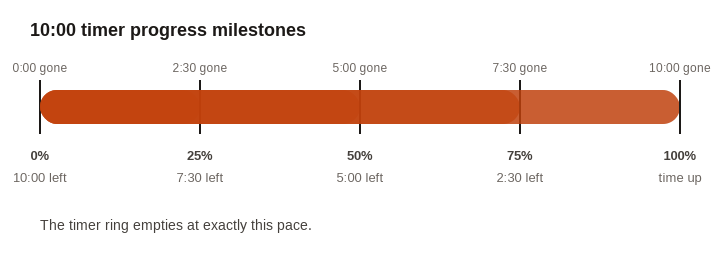
A clock face or plain digits ask you to do subtraction every time you look. A disc that drains removes that step: half the colour gone means half the time gone. That small change matters during a hard stretch of work, when the brain has less spare effort for arithmetic.
The same visual edge helps with starting. "Work until it is done" feels endless, while "work until the disc is empty" has a finish line. I notice the effect most on tasks I have been avoiding; the moment the disc starts shrinking, the task becomes a fixed-size job.
Whether the shape is a disk, a bar or a wedge, the principle is the same, and it skips the number processing that digits demand. That is why a visual countdown is such a common support tool against procrastination.
Which timer techniques suit an ADHD brain?
The timer techniques people with ADHD commonly try are short pomodoro-style blocks, time boxing, body doubling and transition warnings, because each gives the day outside structure instead of relying on willpower. If you want the classic 25/5 rhythm with automatic breaks, switch to the pomodoro timer.
Pomodoro-style work alternates a visible work interval with a visible break, typically 25 minutes on and 5 off, with a longer rest after four cycles. Time boxing gives a task a fixed slot and stops when the timer ends, finished or not, which limits endless polishing. Time boxing can make an unpleasant task easier to begin because it promises an endpoint.
Body doubling means working alongside another person, online or face to face, with one shared timer; the shared start and stop adds gentle accountability. A transition warning is a timer set 5 to 10 minutes before you have to switch activities, so the change is expected rather than sudden.
At home, that warning can make switching less sudden. Pick block lengths that fit your energy level, and keep a few quick starts of 5 minutes for days when nothing else works.
How long should an ADHD timer be set for?
An ADHD timer should be set for a length you can start without dread, which for many people means 10 to 15 minutes for small jobs and about 25 minutes for focused work. Match the length to your energy level that day, not to an ideal.
The table lists common durations and what they suit. Treat it as a starting map, then adjust after a week of real use.
| Duration | Good for |
|---|---|
| 5 minutes | Short breaks, transitions, quick starts |
| 10–15 minutes | Email, quick tasks, admin, low-focus slumps |
| 25 minutes | Classic pomodoro blocks and study |
| 45–50 minutes | Deep work that still needs a set end |
| 15–30 minutes | Longer breaks, meals, exercise |
Even a 10-minute timer can make starting easier. Once the first block is done, you can press +1 min or start another block instead of renegotiating the whole task.
Short blocks keep you from drifting, turn breaks into built-in rewards and act as a mini-deadline. The shrinking disc also adds a sense of progress within each block.
How do I make a timer habit stick with ADHD?
A timer habit sticks when the timer is always visible, always used the same way, and set short enough that you never dread pressing Start. Consistency beats clever settings. Save low-focus hours for administrative or quick tasks in 10-minute blocks, and give deep work a planned stopping point; time boxing the admin pile is often enough to clear it.
Put the timer where you can see it without hunting for it; a second screen or full screen on a tablet works well. If you catch yourself checking it seven times in a few minutes, make it smaller or move it to the edge of your view. Use it for unpleasant jobs first, because a clear endpoint makes a dreaded chore shorter in your head.
Time the breaks too, or a 5-minute rest turns into an hour. A second alarm on a phone placed across the room makes you stand up, which is often the push needed to switch, and it eases the physical discomfort of sitting too long. Treat the first week as an experiment and keep what works. If working alone keeps failing, try body doubling, online or in-person, for the accountability of a shared start.
Is a visual timer better than a digital countdown?
A visual timer can be easier for some people with ADHD than a digital countdown because the shrinking shape shows remaining time at a glance, while numbers need reading and processing each time you look. Numbers need mental math; a disc lets you gauge time without clock-reading skills.
Digital digits also tend to blend into the background after a while; 14:52 and 13:48 look much the same from across a desk. A disc that is visibly a quarter full gives an instant sense of progress, which can be motivating on its own.
That does not mean digits are useless. Some people want both: the disc for a quick read and the numbers for precision. This tool shows both, and you can go full screen so the disc fills the display without any other distractions.
Can a timer pull me out of hyperfocus?
A timer can help pull you out of hyperfocus by acting as an outside interrupt that forces a check-in at a set time, before deep focus costs you a meal, an appointment or sleep.
Hyperfocus feels productive, and sometimes it is, but it can also lead to skipped meals, missed appointments, physical discomfort from sitting too long, and burnout. A timer does not stop you; it asks a question: is this still the most important thing? Set the timer for exercise, meals or bedtime, and add a backup alarm if the stakes are high.
I set a timer for the moment I need to leave, not for the work itself, and turn on Repeat when finished so the countdown restarts 3 seconds after it ends and the alarm returns if I ignore it. The +1 min button is there for finishing a sentence, not for another hour.
How can parents and teachers use an ADHD timer with kids?
Parents and teachers can use an ADHD timer with kids to make time limits visible for homework, chores and transitions, which removes a lot of arguing about how much time is left. A shrinking disc works even before a child can read a clock.
Start with short, winnable blocks, such as 10 minutes of reading, and show the timer a few minutes before a switch, like screen time ending before homework. Children react differently: one source reports that roughly a quarter of the children looked at the timer more than seven times within five minutes, while others never looked at it. A classroom timer with the same shrinking disc suits group activities.
For a constant checker, try a bigger display placed further away; for a child who ignores it, put it closer and say out loud when it starts. The aim is calmer switches, not a race.
Keep the routine consistent so the timer becomes a habit, place it in the child's peripheral view if it distracts, and watch for fidgeting or restlessness as a sign that a block is too long, whether the job is a chore or a worksheet. Some classrooms prefer physical timers to avoid screen distraction.
What does research say about visual timers for ADHD?
Research on visual timers for ADHD is limited, but one result is encouraging: one peer-reviewed study during a timed elementary math assessment found that children with a visible visual timer showed significantly lower anticipatory anxiety and fewer inattentive and fidgety behaviors.
In that study, the largest effect appeared in children who scored as higher-risk on the Conners' questionnaire, a common ADHD rating scale. It measured anxiety and on-task behavior during one kind of test, so it does not prove that timers make everyone faster.
Be wary of bold numbers online. A widely shared claim that visual timers make tasks 40% faster could not be traced to a verifiable study. The honest summary is that a timer is a cheap, low-risk aid that may help some people, not a treatment.
How to use the ADHD Timer
The ADHD Timer runs in your browser with no signup, and you set it the same way as any countdown:
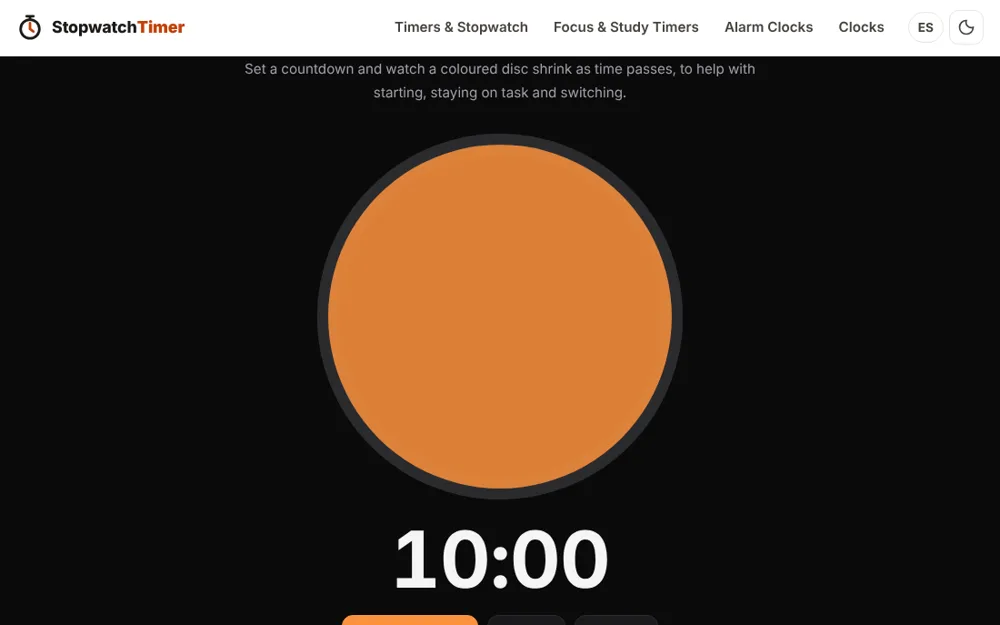
- Type hours (0–99), minutes (0–59) and seconds (0–59), or click one of the preset buttons, which starts that length straight away.
- Press Start or Space. The coloured disc begins to shrink, and Pause, Resume and Reset are always one click away.
- Press +1 min (or the + key) to add a minute while it runs, and F for full screen.
- When time is up, the chosen sound rings, a "Time's up!" banner appears with Stop alarm and Restart, and Esc stops the alarm.
Worked example: enter 0 hours, 15 minutes, 0 seconds and turn on Repeat when finished. Result: a 15-minute countdown with a full disc that shrinks to nothing as the countdown reaches 0:00, rings, then restarts automatically after 3 seconds for the next block.
You can also pick one of five sounds (Beep, Chime, Digital, Soft or Bell), set the volume, use Test sound, and allow a desktop notification. Your sound and volume choices are remembered by your browser. If you want to keep going after the end-of-timer sound, stop the alarm and press Start on a fresh block.
How does the ADHD Timer keep accurate time?
The ADHD Timer keeps accurate time by fixing the end moment as the start time plus the duration and checking it against your device clock 4 times a second, so it finishes on time even if the tab is in the background.
Browsers slow down animations in background tabs, so the disc may update less smoothly when you are on another page, but the end check is not slowed. The remaining time also appears in the browser tab title, so a quick look at the tab tells you where you are.
Where the browser supports the Screen Wake Lock API, the screen stays awake while the timer runs. That matters most in full screen on a laptop, where a sleeping display would hide the disc right when you need it. For appointments, the device-clock check is what matters, and a full-screen disc will not blend into a cluttered desktop.
Need a different tool? Browse all focus & study timers.
This timer is a general productivity aid, not medical advice or treatment. For questions about ADHD diagnosis or care, talk to a qualified clinician.
Frequently asked questions
Can an ADHD timer replace diagnosis or treatment?
No, an ADHD timer cannot replace diagnosis or treatment; it is a time-management aid for the moment, not a therapy. If problems such as persistent inattention, impulsivity or disorganization show up across home, school or work, an evaluation by a healthcare provider is the right next step.
A peer-reviewed study did find lower anticipatory anxiety and fewer inattentive behaviors during a timed math assessment, with the largest effect in children rated higher-risk on the Conners' questionnaire, but that is support, not treatment.
Is a free online ADHD timer as good as a physical one?
A free online ADHD timer uses the same shrinking-disc idea as a physical timer, so it is a reasonable free alternative that needs no signup. Physical timers avoid screen distraction, which is why some classrooms prefer them. Try the free version for a week before deciding whether you want a device. Treat that first week as a test, and ignore marketing claims such as the unverified 40% speed figure.
Should I turn off the alarm when I want to keep going?
You can let the alarm end and keep going if the work is flowing, because the timer has already done its job of getting you started. Press Stop alarm or Esc, then decide whether to set a new end-of-timer point. Leaving the next block open-ended is where hyperfocus tends to creep back in. That is how skipped meals and burnout sneak up.
How do I use a timer when a task feels too big?
When a task feels too big, set a timer for a fixed amount of time and work on it until the timer ends, without needing to know every next step. "Work on the report for 15 minutes" is finite and easy to start. A finite block also makes it easier to persist, because the end is always in sight, even on complex projects.