What is a pomodoro timer and how do you use one?
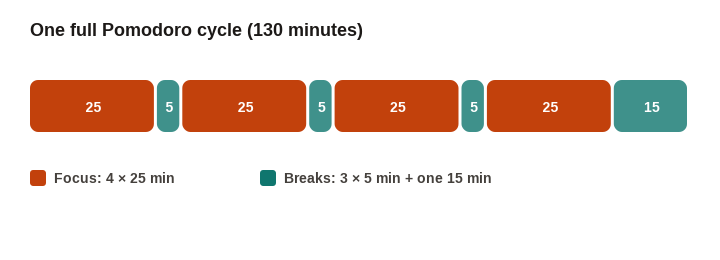
A pomodoro timer is a countdown that splits your work into focus blocks (classically 25 minutes) separated by short breaks, with a longer break after every fourth block. You pick one task, press Start, work until the sound plays, rest, and repeat.
On this page
- Where did the Pomodoro Technique come from, and how does it work?
- How to use the Pomodoro Timer
- What should a good focus timer include?
- How long should a pomodoro or focus session be?
- Is a pomodoro timer helpful for ADHD?
- How do I build a study timer schedule for the day?
- How do I keep a focus block from falling apart?
- Why do short breaks help you stay sharp?
- How does the Pomodoro Timer keep accurate time?
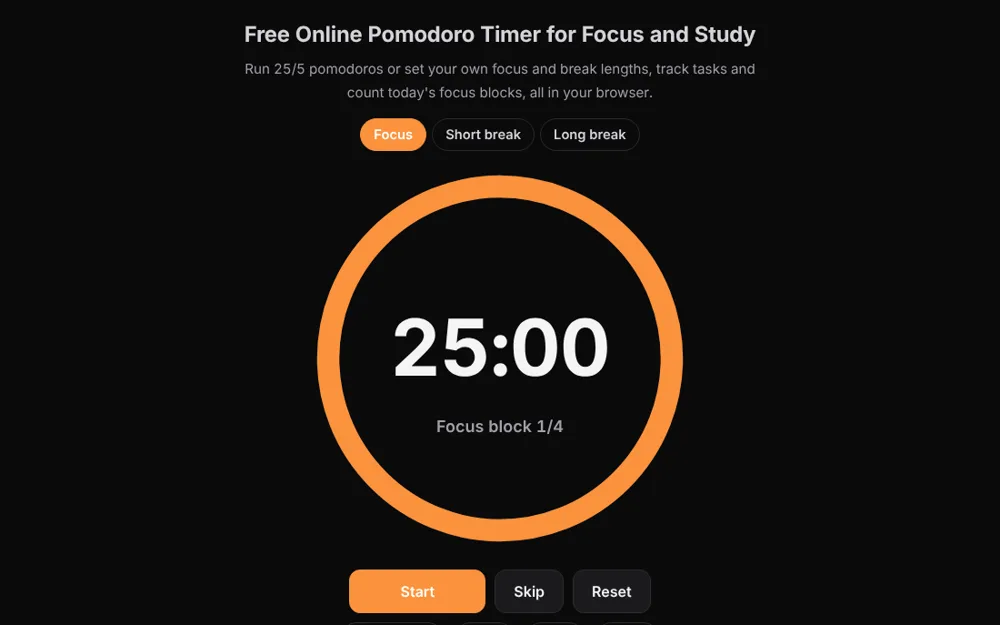
The pomodoro timer on this page runs that whole cycle for you: Focus, Short break and Long break tabs, a task list, and a counter of focus blocks finished today. The defaults follow the method Francesco Cirillo built in the late 1980s as a university student, named after the tomato-shaped kitchen timer on his desk (the Italian word pomodoro means tomato).
Every length is editable, so the same tool doubles as a study timer, a homework timer or a deep-work focus timer.
Treat 25 minutes as a guideline rather than a rule; I treat the first pomodoro of the day as a test of the plan. If one 25-minute block feels like a sprint, the settings, not your discipline, need adjusting, and the sections below show how.
Where did the Pomodoro Technique come from, and how does it work?
The Pomodoro Technique is a time-management method created by Francesco Cirillo in the late 1980s, built on short, timed work intervals and planned rests. Cirillo was a university student when he started timing his study with a kitchen timer shaped like a tomato, and pomodoro is simply the Italian word for tomato.
The logic is less about the clock and more about the size of the promise. "Work on the thesis all afternoon" is vague and easy to postpone, while "write for one block" is a small, time-blocked commitment that is hard to refuse. That small promise is the real tool against procrastination.
The original rhythm is 25 minutes on and 5 minutes off, with a longer rest after the fourth block, and for most beginners that remains the sweet spot. Writers, developers doing coding sprints, and anyone studying for exams tend to keep the structure but tune the numbers, which is why a customizable timer matters more than the exact default. Some people who need a longer warm-up move to 50 minutes, and for quick tasks the 25 minute timer is enough on its own.
How to use the Pomodoro Timer
The Pomodoro Timer works in any desktop or mobile browser with no sign-up and no download, and it needs only a click on Start. Here is the routine I follow:
- Add the task you will work on to the task list, a simple to-do list that is saved in your browser, and tick it off when it is done.
- Pick a method button (25/5 classic, 50/10, 52/17 or 90/20) or type your own lengths under Focus, Short break and Long break.
- Press Start (or Space) and work until the end sound; the label shows where you are, such as "Focus block 2/4".
- Take the break. The next block starts by itself because Start the next block automatically is on by default; untick it if you prefer to press Start each time.
Worked example: choose 50/10, keep the long break at 15 minutes and blocks at 4, and leave auto-start on. Result: four 50-minute focus blocks, three 10-minute short breaks and one 15-minute long break, a session of 4 hours 5 minutes (200 + 30 + 15 minutes).
Keyboard shortcuts keep your hands on the keyboard: Space starts or pauses, N skips to the next block, R resets and F opens full screen. A desktop notification can fire at the end of each block if you allow it, and on a tablet you can add the page to the Home Screen from your browser's menu.
What should a good focus timer include?
A good focus timer includes adjustable focus and break lengths, an automatic long break, a clear progress display, an end sound, and a place to write down the current task. Everything beyond that is optional decoration.
This tool keeps the essentials.
You get a progress ring, five generated sounds (Beep, Chime, Digital, Soft, Bell) with a volume slider and Test sound, a task list, and a daily counter of finished blocks. Sound, volume and theme are remembered by your browser, and nothing is sent to a server, so there is no account to create.
I have found that a quiet screen helps me more than rewards or music, but if you like music, play your own in another tab. The Skip button is the feature I use most: when a block runs long because I am in flow, I finish the thought and skip the break.
How long should a pomodoro or focus session be?
A pomodoro session should be as long as you can stay on one task without drifting, and 25 minutes is the sensible starting point because a block that size lets you get real work done yet is small enough to begin without dread. Treat 25 minutes as a starting value, not a law, and save the most demanding work for the hours when your energy is highest, often the morning.
Shorter blocks of 15 to 20 minutes help people who struggle to start, and longer formats exist for deep tasks. The table compares the four method buttons on this page with the 45/15 split some people use for dense theory or complex math.
| Method | Focus | Break | Typical use |
|---|---|---|---|
| Classic | 25 min | 5 min | Starting out, routine tasks, quick wins |
| 50/10 | 50 min | 10 min | Study blocks, writing drafts |
| 52/17 | 52 min | 17 min | People who reach flow and find 25 too short |
| 45/15 | 45 min | 15 min | Complex mathematics or dense theory |
| 90/20 | 90 min | 20 min | Experienced deep work |
The 90/20 format is often linked to a roughly 90-minute cycle of alertness. Writers can grow into it, but I would extend blocks slowly, five minutes per week, rather than jumping straight from 25 minutes to an hour and a half.
Is a pomodoro timer helpful for ADHD?
A pomodoro timer can help some people with ADHD because a countdown on screen and breaks that arrive at a known time give outside structure to the hardest moment, which is starting. Interruptions also hurt less when the next pause is already fixed. The timer answers "when can I stop?", so attention is free for the task.
Shorter blocks usually suit this better than the classic default. Short cycles are a common suggestion, and some people begin with a 10-minute block and extend it gradually as the habit settles, in the same way a beginner might lengthen blocks toward the 45/15 split. On this page, type 15 into Focus and 5 into Short break to set that up.
Short recovery breaks matter even more here, so keep them. A timer is a support tool, not treatment. For diagnosis or treatment of ADHD, talk to a qualified clinician. The site also has a dedicated ADHD timer with a shrinking coloured disc, which some people find easier to read at a glance than numbers, and an aesthetic timer if you prefer softer scenes for your focus blocks.
How do I build a study timer schedule for the day?
A study timer schedule works best when you estimate your total study time, divide it into pomodoros, and put the hardest subject where your energy is highest. A typical person can sustain 8 to 12 pomodoros per day, so a plan of about 9 blocks fits comfortably. One common framework splits the day into three parts.
In the morning, run 4 pomodoros, roughly two hours of focus, on your most demanding subject, the one that needs real thinking. In the afternoon, when many people feel the post-lunch dip, give 2 to 3 pomodoros to practice problems, reading and review. In the evening, spend 1 to 2 pomodoros consolidating notes, then stop. Keeping the evening short is a commitment to sleep as much as to study.
For homework, the same idea scales down: one pomodoro per assignment, with the hardest worksheet first and 5 minutes of break between, a time management habit that makes the session feel less overwhelming. I write the subjects into the task list the night before, so the morning starts with Start instead of a planning debate.
How do I keep a focus block from falling apart?
A focus block survives when you name the task before pressing Start and treat the running timer as untouchable until it ends. Interruptions are where most pomodoros fail.
When an idea, an email or a reminder pops up, jot down those distractions in the task list instead of acting on them.
That one-line log is enough to calm the urge, and you handle it in the break. Consolidating the list at the break takes a minute. If you truly must deal with something urgent, reset the block and start a fresh one rather than pretending the broken one counts.
Breaks need real recovery, not more stimulation. Stand up, move, and rest your eyes on a point over 6 metres away from the screen. Checking social media feels like rest but keeps your brain in input mode, and you come back to the next block foggy.
Why do short breaks help you stay sharp?
Short breaks help because they counter mental fatigue. A University of Illinois study by Ariga and Lleras (2011) found that performance held steady for participants given two brief pauses within a 50-minute task, while the group without breaks declined.
That finding fits the shape of the method. The work blocks protect depth, and the breaks protect against tiredness, so the fourth block of the day is still useful rather than a blur. Break time should not mean more stimulation from social media; stand, stretch, and look at something 6 metres away.
There is a second, quieter benefit: counted blocks turn effort into visible progress. After a few weeks you know a lab report takes about six pomodoros, so planning gets honest. Remote teams can use the same trick by running shared blocks together.
How does the Pomodoro Timer keep accurate time?
The Pomodoro Timer keeps accurate time by reading your device clock: each block's end moment is fixed as its start time plus the block length, and the remaining time is calculated from that end moment. The display is only a view of that calculation.
Because the count is tied to the clock, the timer does not drift when the tab sits in the background, where browsers slow down animations. On iPhone and Android, though, a phone may pause background tabs and delay the end alarm, so keep the page in front. The remaining time also appears in the browser tab title, so you can glance at it from another tab.
Where the browser supports the Screen Wake Lock API, the screen stays awake while a block runs, which matters in full screen on a laptop. When a block ends, the chosen sound plays and the next phase starts, automatically by default, or when you press Start if you turned auto-start off.
Need a different tool? Browse all focus & study timers.
Frequently asked questions
Is this pomodoro timer free to use?
Yes, this pomodoro timer is free to use, and you never need to register or pay to unlock features. Your tasks and settings are saved in your own browser rather than on a server, so nothing personal is collected to run it. You can open the page and press Start straight away.
Can I use the pomodoro timer as a study timer or homework timer?
Yes, the pomodoro timer works as a study timer or homework timer because every length is editable: focus from 1 to 180 minutes, short breaks from 1 to 60, long breaks from 1 to 90.
For daily study, the 50/10 button suits long stretches, while 15 to 20 minute blocks suit anyone who finds it hard to start. In the evening, a block for practice problems or a quick review of notes works well, and the post-lunch dip is a good time for lighter subjects.
How many pomodoros come before a long break?
Four pomodoros come before a long break in the classic method, often described as four rounds of 25-minute intervals, and this timer schedules the long break automatically after the fourth focus block. You can change the count anywhere from 1 to 12 blocks. A long break of 15 to 30 minutes is the usual range, and 15 minutes is the default here.
How many pomodoros can you do in a day?
A typical person can sustain somewhere around 8 to 12 pomodoros per day, which is about 3 to 5 hours of focused work at 25 minutes each. Beyond that, quality tends to drop, and people running 90/20 blocks tied to the ultradian rhythm will fit fewer, longer blocks. The counter of focus blocks finished today helps you see where your own limit sits.
Does the pomodoro timer work on a phone?
Yes, the pomodoro timer runs in phone and tablet browsers on iPhone and Android without an app. Keep the page open in front while a block runs so the end sound is not held back. You can also add the page to your Home Screen for quick access.
Does the Pomodoro Technique really work?
The Pomodoro Technique works for many people because a visible countdown and scheduled breaks lower the barrier to starting and add external structure.
A University of Illinois study by Ariga and Lleras (2011) found that performance held steady for participants given two brief pauses within a 50-minute task, while the group without breaks declined, which fits the idea that breaks counter mental fatigue.
It is not magic: it fails when a block is not treated as untouchable, or when you skip the log of interruptions and breaks turn into scrolling. Give it a week with honest blocks before judging it.
Can a pomodoro timer help with remote work?
A pomodoro timer helps remote workers, including developers coding from home, by replacing the rhythm and accountability an office provides with fixed work and rest periods.
The daily counter becomes a simple record of effort you can review at the end of the day, and teams can run shared blocks on a video call. Studying or writing from home benefits the same way, since procrastination thrives without time-blocked plans; this works on desktop or mobile with no sign-up and in any browser.
Answering email in one block instead of all day helps too. Setting the blocks the evening before can help you start faster, because the first task is already waiting in the list.