What is an online flip clock?
An online flip clock is a free browser clock that shows the current time from your device as split-flap digits, with each card flipping over the moment its digit changes. Open the page and it runs at once: hours and minutes, plus seconds if you want them, with no setup and no account.
On this page
The appeal is part nostalgia and part practicality. The cards look good on a spare screen, and the large numbers stay readable from across a room in a way a tiny taskbar clock never does. Mine sits on an old laptop on the shelf and works as a desk clock that never needs batteries.
Because the page reads your system time, it is exactly as right as your computer's clock. If your device syncs its time automatically, as most do, the flip clock is correct to the second without you touching anything.
How to use the flip clock
The flip clock needs no input: open the page and the time appears, then use the three toggles under the clock, or the Style button, to change the look. Each change applies instantly and is remembered in your browser for the next visit.
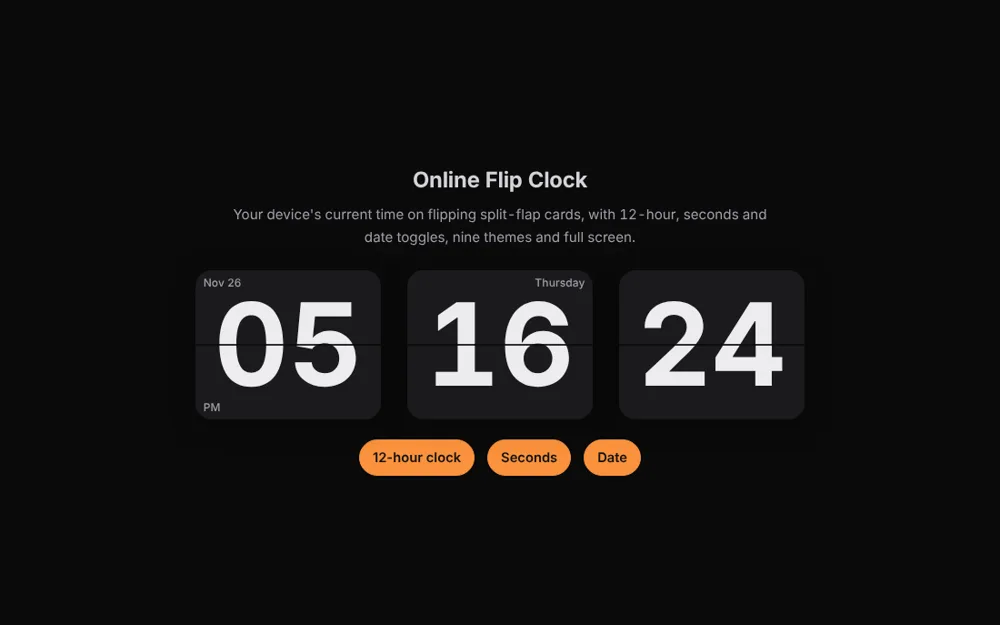
- Format: turn on 12-hour clock for AM/PM, or leave it off for 24-hour time.
- Detail: switch Seconds and Date on or off.
- Look: press Style and pick one of nine themes, such as Dark, Light, Midnight or Sand, plus an optional scene.
- Size: press the Full screen button, or the F key, so the digits fill the whole screen.
Worked example: 12-hour clock on, Seconds off, Date on, theme Midnight, then F for full screen. Result: a full-screen clock showing hours and minutes with AM/PM, and today's date and weekday printed on the cards, cards flipping once a minute, and the screen kept awake. That is the setup I leave running on a spare monitor.
The flip animations are the whole point of the classic look. A fullscreen button is the fastest way to see them at their best, and the setting can be toggled back with a second press or Esc.
What can you use a full-screen flip clock for?
A full-screen flip clock works anywhere people need to see the time at a glance without a busy interface around it. The flipping numbers of the old departure boards in train stations are the obvious model, and the same retro-style look suits plenty of modern rooms:
- Workspace: a second monitor beside your main screen, as a quiet aesthetic clock during focused work.
- Streaming and talks: a vintage on-screen clock behind a webcam scene or on a stage display.
- Shops and studios: a TV or tablet showing the time to customers in a nostalgic style.
- Classrooms: a big wall display so students can track the time without asking.
The digits sit in a horizontal row, so a landscape screen gives the biggest result. If you prefer plain digits without the flip, the online clock is the simpler cousin, and the full screen timer suits talks where you need a countdown instead.
The mechanical feel comes from the motion, not the sound. There is no ticking or click, which is what makes it usable in an office or a quiet room.
Which display options does the flip clock have?
The flip clock has three display toggles (12-hour clock, Seconds and Date), nine color themes and a full-screen mode. The toggles sit right under the clock; card size, corner radius, scenes and a night dim are in the Style panel if you want more.
Size is handled by full screen, which scales the digits to your screen automatically. The date line shows the day and month in your browser's own language format.
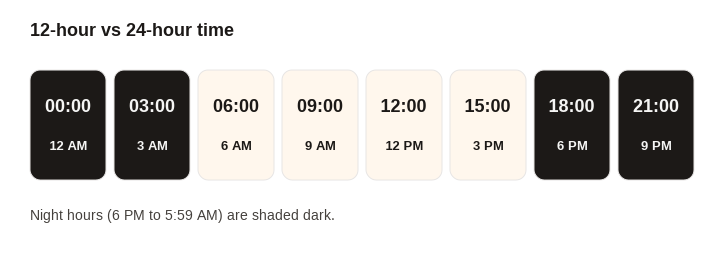
The 12-hour and 24-hour choice is the one most people change first. In the US, 12-hour with AM/PM is the norm; in much of the world, a 24-hour clock is easier to read at a distance because there is no AM/PM label to squint at. Whatever you choose stays saved, so the page opens with the same layout, ready for fullscreen mode, on your next visit.
How does the flip clock keep accurate time?
The flip clock keeps accurate time by reading your device's clock and time zone directly, so it shows exactly what your computer or phone believes the time to be. It does not count seconds on its own, which means it cannot drift away from your device even after running for days.
Each card is redrawn when its digit changes, so a minute card flips once a minute and the hour card once an hour. The page updates automatically across midnight and daylight saving changes, because your device handles both.
That also means the flip clock is only as accurate as the device. Most computer, tablet and phone systems set their time from the internet automatically; if yours is set by hand, check it once against an official time source. Traditional wall clocks drift by seconds a week, and this one inherits your device's accuracy instead.
Can the flip clock show other time zones?
No, the flip clock shows only your device's own time zone, because it reads the time straight from your device. For major cities and other time zones, use the world clock page, which lists local times for New York, London, Tokyo and more, with daylight saving applied.
This is a deliberate choice. A single-zone clock suits presentations, live streams and work sessions, where everyone in the room shares one time. If you work with a team abroad, keep the flip clock for your own time and open the world clock in another tab.
You can still show another city's time if you travel: change your device's time zone setting, reload the page, and the cards follow.
Need a different tool? Browse all clocks.
Frequently asked questions
Does the flip clock show seconds?
Yes, the flip clock shows seconds when the Seconds toggle is on, and the seconds cards flip every second. Turn Seconds off for a calmer display with hours and minutes only. Your choice is saved in the browser's settings storage and comes back on your next visit.
Can I use the flip clock in full screen?
Yes, the flip clock runs in full screen when you press the Full screen button or the F key, and the screen is kept awake while it is open. It fills secondary monitors, TVs and other digital displays, and reads well from a distance in coffee shops, studios and offices. No installation is needed: any modern browser works.
Is the flip animation smooth?
Yes, the flip animation is smooth on any modern device, because each card moves only when its digit changes. The flip motion is short and quiet, so it stays distraction-free on a second screen. If you find even that too busy, turn Seconds off and the cards move once a minute.
Will the flip clock stop my screen going to sleep?
Yes, the flip clock stops your screen going to sleep while it is in full screen, using the browser's Screen Wake Lock where supported, so there is no separate Keep Screen On switch. The display stays lit during downloads or other long-running tasks, instead of turning off after your usual idle time. If your browser lacks wake lock support, change your device's power settings to stop it sleeping. For major cities and their local times in other time zones, pair it with the world clock page.