What is an online clock?
An online clock is a web page that shows the current time from your device's time in large digits, updating automatically every second without any setup. This one adds 12-hour, seconds and date toggles, nine themes and a full screen mode, and it follows your own time zone.
On this page
The point is size and calm. A phone clock is small and buried behind notifications; a big clock on a spare screen is readable from across the room. I keep one on a secondary monitor while I work, and teachers often put one on classroom projectors so nobody has to ask how long is left.
Nothing needs installing, and nothing about you is sent anywhere. The page reads the time your device already keeps, so if your computer is right, the clock is right.
How to use the online clock
The online clock starts showing the time the moment the page opens, and it is free to use in any browser with no installation. Use the toggles under the clock to change what it shows, and your choices are saved for next time.
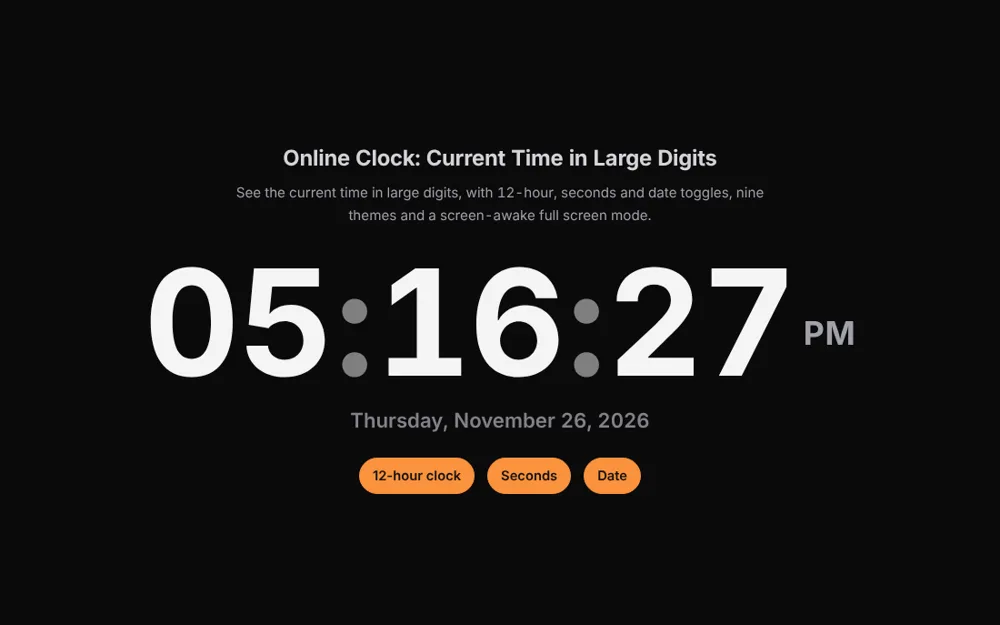
- Format: switch 12-hour clock on for AM/PM, or off for 24-hour time.
- Detail: turn Seconds and Date on or off.
- Theme: press Style and choose one of nine preset themes, such as Dark, Light or Midnight; each changes the colors in one tap.
- Full screen: press the fullscreen button or F, and the clock scales up to fill the screen.
Worked example: 12-hour clock off, Seconds on, Date on, theme Dark, then F. Result: a large-format 24-hour clock such as 14:05:32 with the date beneath it, filling the screen in white on black, with the screen kept awake. That minimalist look is the one I use for long work sessions, because it adds no distractions to the room, and it makes a decent full-screen clock on a TV too.
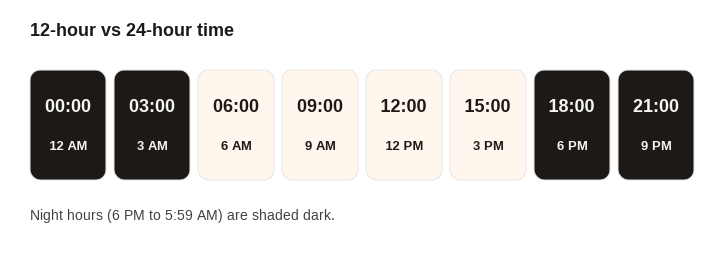
What can you use an online clock for?
An online clock is useful anywhere a group or a single person needs the time in sight without picking up a phone. These are the setups I see most:
- Classrooms: a wall display or smartboards during tests, so students in a classroom pace themselves; it works in schools and exam halls alike.
- Home desks: a second screen on study desks or home-office monitors, set to Seconds off for less motion.
- Mobile: phones and tablets propped on a shelf as a bedside or kitchen clock.
- Presentations: a corner monitor so a speaker can watch the time without a watch.
The clock reads well because the digits are big and plain. On a wide screen, turning the Date off gives the numbers more room. On a tablet in portrait, the clock fills the width, and you can rotate to landscape for larger digits.
What features does the online clock include?
The online clock includes large digital digits, three display toggles (12-hour clock, Seconds, Date), nine themes and a full screen mode that keeps your screen awake.
The 12- or 24-hour format is the setting most people change first. The layout stays steady as the time changes, because the digits are drawn at a constant width, much like the fixed-width digits on a station board. Real-time seconds tick over in place, so the clock does not jump around.
The quick settings are deliberately few: three toggles under the clock, with themes, scenes and size in the Style panel. Because each toggle is visible under the clock, changing the look takes one click rather than a hunt through menus.
Which other time tools work alongside the online clock?
The online clock works alongside four other free tools on this site: an alarm clock, a stopwatch, a countdown timer and a world clock. Each one is a separate page, so the clock stays clean while the other tools do their own jobs.
| Tool | What it does | Useful for |
|---|---|---|
| Alarm clock | Rings at a set time, with a label and snooze | Wake-ups, reminders |
| Stopwatch | Counts up with laps and CSV export | Workouts, timing tasks |
| Timer | Counts down from a set time | Cooking, breaks, Pomodoro rounds |
| World clock | Shows cities with their UTC offsets | Calls with international audiences |
I pair the clock with the timer most often. Clock on one screen for the office or workspace, timer in another tab for working from home in focus blocks, and a round of the pomodoro timer when a task needs it. If you like a retro look, the flip clock page shows the same time on split-flap cards.
How does the online clock keep accurate time?
The online clock keeps accurate time by reading your device's clock directly, so it always shows exactly what your device says, including your time zone and daylight saving changes. It does not count seconds on its own, so it cannot drift even after days on screen.
Each display update lands on the second boundary of your device clock, which is why the seconds change in step with your computer's own clock. Your device, in turn, usually keeps itself right by syncing with standard time sources over the internet.
If the clock looks wrong, the fix is on the device, not the page: turn on automatic time and time zone in your system settings, then refresh the page. The UTC offset of your zone is shown on the world clock page if you want to double-check it.
Need a different tool? Browse all clocks.
Frequently asked questions
Does the online clock work on mobile?
Yes, the online clock works on mobile in any modern browser, and the digits resize to fit the screen. Press Full screen to hide the browser bars. The same page works for presenting from a laptop, streaming with the clock in a scene, or as a desktop clock beside your work.
Can the online clock stop my screen from going to sleep?
Yes: press Full screen, and the online clock asks the browser to keep the screen awake for as long as it stays open. That uses the Screen Wake Lock feature where the browser supports it, so the clock suits long tasks like downloads or a long exam. If your browser does not support it, raise your device's sleep timeout in its power settings.
How do I switch between 12-hour and 24-hour time?
Use the 12-hour clock toggle under the digits: on shows AM/PM time, off shows 24-hour time. The choice is remembered in your browser, so the next visit opens the same way. Other tools on the site follow similar rules, such as the alarm clock, which picks AM/PM or 24-hour from your device, with its own ringtone choice and snooze.
Does the online clock work offline?
The online clock needs a connection only to load the page; after that, the time comes from your device, not the internet. Your device keeps time through network time servers and internet time standards when it is online, and its own clock while it is not. If you reload the page without a connection, it may not open, so leave the tab open. Turn on automatic time in your device settings for the best accuracy. The countdown timer, stopwatch and lap tools behave the same way once loaded.
Is my data stored anywhere?
Your clock settings are stored only in your own browser, and nothing is sent to a server or tied to an account. There is no dashboard or sign-in, so the 12-hour, seconds, date and theme choices live on the device you set them on. They come back when you return, and local storage can be wiped by clearing your browser's site data.
Can I customize the online clock's appearance?
Yes, you can customize the online clock with nine themes and three toggles, which cover color, format and detail. The Size slider in the Style panel, or full screen, makes the digits bigger. Choose Midnight or Dark for a dim room and Light for daylight; the theme you pick is kept in your browser's local storage.
Can I use the online clock in schools and exam halls?
Yes, the online clock works well in schools and exam halls as a large, distraction-free time display on a projector or smartboard. In full screen, the display stays on through the browser's wake lock, so the screen avoids turning off mid-exam. For a timed section, pair it with the online timer and its presets and progress ring. For colleagues abroad, open the world clock, and the alarm clock takes a label such as "Exam ends".
Is the online clock free?
Yes, the online clock is completely free, with no sign-up. Once the page has loaded, it keeps working without a connection, though a connection is needed to open it again. Settings are never uploaded, and clearing site data resets them. The layout is responsive on phones and tablets, and the time is accurate to the second as long as your device clock is. Mobile browsers may suspend hidden tabs, but the clock catches up the instant you return. The clock never rings, so an invigilator can simply leave it running in a quiet room.