How long is each part of the digital SAT, and how do I time it?
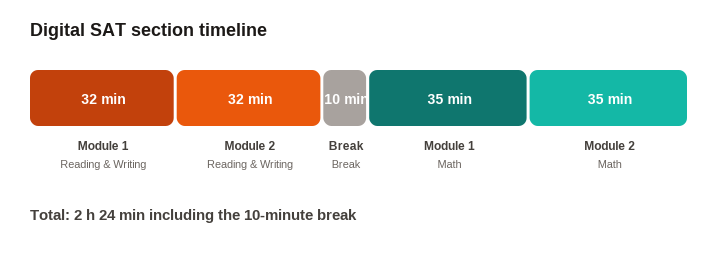
The digital SAT has two Reading and Writing modules of 32 minutes each, a 10-minute break, and two Math modules of 35 minutes each, for 134 minutes of testing (2 hours 14 minutes) across 98 questions. An SAT timer lets you practice that exact structure at home, one module or the whole test.
On this page
- What is the current digital SAT timing?
- How much time do you get per SAT question?
- How to use the SAT Timer
- How do I make a home practice test feel like test day?
- Why should full practice tests still run in Bluebook?
- How do extended-time accommodations affect SAT practice timing?
- How does the SAT Timer keep accurate time?
The SAT timer on this page runs the test as a sequence of section buttons, so you can start any single section or move through all of them. It never jumps ahead on its own: when a section ends, the sound plays, and pressing Stop loads the next section, ready for you to start it.
One limit matters up front. On test day, Bluebook handles the clock and times each module itself, so this tool is for drills and pacing practice in the weeks before test day, not for test day. A good rhythm is about 71 seconds per Reading and Writing question and about 95 seconds per Math question. It works in any browser with no account or sign-up, and between drills the pomodoro timer is handy for planning review sessions.
What is the current digital SAT timing?
The current digital SAT timing, according to College Board, is 64 minutes for Reading and Writing and 70 minutes for Math, with one 10-minute break between sections. Each section is split into two modules of equal length, and in the real test each module runs on its own clock. On this page the five parts form one sequence, and you can start any single section from its button.
| Part | Time | Questions |
|---|---|---|
| Reading and Writing, module 1 | 32 min | 54 across the section |
| Reading and Writing, module 2 | 32 min | |
| Break | 10 min | — |
| Math, module 1 | 35 min | 44 across the section |
| Math, module 2 | 35 min |
Add the break and the sitting lasts about 2 hours 24 minutes, before check-in. That standard time is the structure this timer follows. There is no scheduled break inside the Reading and Writing section, so module 2 starts as soon as module 1 ends; the only planned rest is the one between sections.
How much time do you get per SAT question?
You get roughly a minute and 11 seconds per Reading and Writing question and just over a minute and a half per Math question, which is simply 64 minutes divided by 54 questions and 70 minutes divided by 44 questions.
Those averages hide a lot of variation. The first module of each section mixes easy, medium and hard questions, and how you do on it makes the second module more or less difficult, so a hard second module may need more seconds per question than the average suggests. Math lets you use a built-in graphing tool on every question, which changes how long algebra-heavy questions take.
I find the averages most useful as warning lights, not targets. If one skill keeps eating two minutes a question in practice, that is the area to study, and reviewing timed sets the next day shows whether the pace is improving.
How to use the SAT Timer
The SAT Timer is a countdown with a button for each part of the digital SAT, and you use it like this:
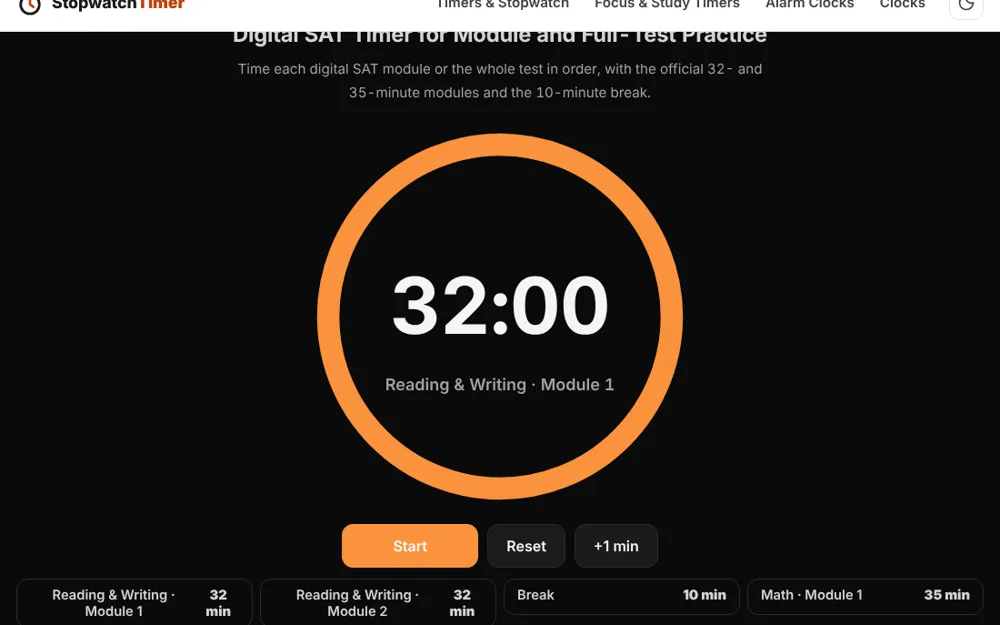
- Choose a section button, for example Reading and Writing module 1, to start that block straight away.
- Work the module with the progress ring and time visible; press Space to pause or resume during drills, and F for full screen.
- When time is up, the chosen sound plays and a "Time's up!" banner appears; press Stop to load the next section in order, then press Start (or its section button).
- Repeat through the break and both Math modules, or stop after single modules if you are drilling one subject.
Worked example: press the Reading and Writing module 1 button, let it run, then press Stop and start module 2 right away, then the 10-minute break, then Math modules 1 and 2. Result: four timed modules and one break, 144 minutes in total (32 + 32 + 10 + 35 + 35).
The +1 min button adds a minute while the timer runs, which helps when you want to practice with different lengths, such as approved extended time. Keep a note of each drill's skill, and over several weeks the pattern of misses becomes clear.
How do I make a home practice test feel like test day?
A home practice test feels like test day when you run it in one sitting, at the same time of day as your test, with the break taken on schedule and no pausing. Real timing only teaches pacing if you cannot stop the clock. Label the practice test by date and subject in your notes so you can compare sittings.
Set up the room first: phone in another room, scratch paper ready, water nearby. During the break, step away from your desk rather than checking answers. If a question stalls you, mark it, make a guess and move on; flag it for later rather than letting one item drain the module.
Watching the ring at the halfway point of each 32-minute module is a simple check that keeps the last questions from becoming panic guesses.
Why should full practice tests still run in Bluebook?
Full practice tests should still run in Bluebook because the digital SAT is adaptive: Bluebook delivers the second module based on your first, and a stand-alone timer cannot do that or give you a scored result.
This timer is not an official simulator: it cannot adapt question difficulty or produce a score, so treat it as a tool for timed drills, single-module practice and pacing between Bluebook practice tests.
My preferred split is simple: use Bluebook for the full adaptive tests, then use the timer to rerun the module that hurt most. Content review with the clock off, so you can review misses and mistakes calmly, then retrying a similar set with the clock on, separates content gaps from speed problems.
How do extended-time accommodations affect SAT practice timing?
Extended-time accommodations lengthen the time you get for each part of the test, so practice should use the lengths College Board has approved for you rather than the standard module times shown above.
The exact lengths depend on the specific accommodation, and formats can change, so confirm them with College Board before you build a practice plan. Some students are also approved for extra breaks, which the standard schedule does not include.
On this page, the simplest approach is to start a section and use +1 min to stretch it, or type the approved length into the hours, minutes and seconds fields, or use the online timer for a single custom countdown. Keep the same order of sections either way, with the break after the second module, so the practice still mirrors the real test.
How does the SAT Timer keep accurate time?
The SAT Timer keeps accurate time by fixing each section's end moment as its start time plus its length and checking that moment against your device clock 4 times a second, so a module ends on time even in background tabs.
Each section gets a fresh end moment. Browsers slow down animations in a background tab, so the ring may move less smoothly when you switch away, but the end check is not slowed. The remaining time also appears in the browser tab title.
Where the browser supports the Screen Wake Lock API, the screen stays awake while a section runs, which matters during a 35-minute Math module on a laptop. Sound and volume choices are remembered in your browser for the next practice session.
Need a different tool? Browse all focus & study timers.
Section timings follow the official test format at the time of writing. Always confirm current timing with the official test maker before your exam.
Frequently asked questions
Is there a break during the SAT?
Yes, the digital SAT has one 10-minute break, placed after the Reading and Writing section and before Math. There is no scheduled break between modules inside a section unless extra breaks are approved as an accommodation. Use the break the way you will on test day: stand up, eat something, and stay away from your desk and your notes.
Can this SAT timer be used on the actual test day?
No, you cannot use this timer during the real test, because Bluebook times each module itself. This SAT timer is an independent practice tool, not an official simulator, so full adaptive simulations belong in Bluebook.
How should I time a complete SAT practice test?
To time a full practice test, run the four modules in order with the 10-minute break after the second module. Start Reading and Writing module 1, start module 2 right away when it ends, take the break, then run both Math modules. Do it in one sitting without pausing, at the time of day you will test, at least once before test day, after you have practiced single modules.
Do I need an account to use the SAT timer?
No, the SAT timer needs no account and no sign-up, and it runs entirely in your browser. Nothing is sent to a server; your sound and volume settings are simply saved on your own device.