How can I set a timer for 30 minutes?
To set a 30 minute timer, press the 30 min preset above, or type 0 hours, 30 minutes and 0 seconds and press Start; the alarm rings when the countdown hits 0:00. Half an hour is exactly 50% of an hour, which makes it the easiest block of time to plan a day around.
On this page
- How to use the 30 minute timer
- What can you time with a 30 minute timer?
- Is 30 minutes long enough for deep work?
- What features does the 30 minute timer include?
- How long is 30 minutes in seconds and milliseconds?
- How do you get the most out of a 30 minute session?
- What mistakes waste a 30 minute session?
- Which dishes fit a 30 minute kitchen timer?
- Is 30 minutes enough for yoga or meditation?
- How do you make a daily 30 minute habit stick?
- How does the 30 minute timer keep accurate time?
Thirty minutes is the default event length in common calendar apps such as Google Calendar and Outlook, so the timer gets used for one-on-one meetings as often as for anything else. It also suits slow kitchen jobs like braises, the warm-up-to-cool-down shape of many HIIT classes, and household screen-time limits of one episode of TV.
I keep a 30 minute countdown running for work that is too big for a quick sprint but too small to deserve a full morning. It is long enough to finish a section of a report, short enough that I never put off starting it.
How to use the 30 minute timer
The 30 minute timer starts with a single press of its preset, and it is free, with no signup, nothing to download and nothing to install beyond the browser you already have. A preset starts the countdown on the first click.
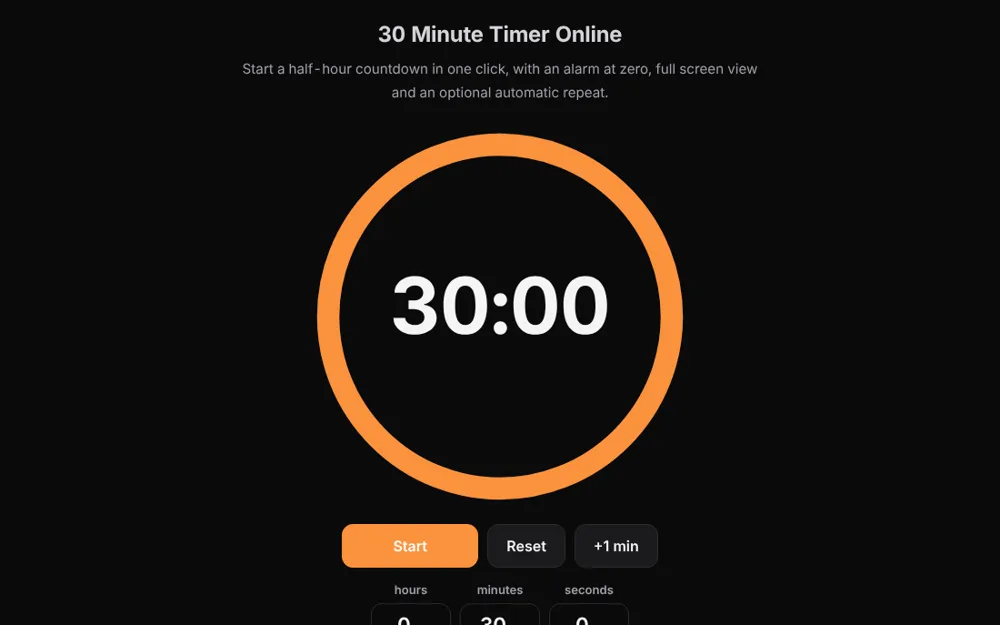
- Start: press the 30 min preset, or type the time and press Start (Space works too).
- Adjust: press +1 min at any point, even while it runs, to stretch the round.
- Stop for a moment: press Pause, then Resume when you are back.
- Reset: press Reset or R to clear the round.
The fullscreen view (F key) shows just the digits and the progress ring, without distractions. Your sound and volume are remembered, and the theme button in the site header switches between light and dark. Drag the volume slider to zero for a silent, visual-only timer.
Worked example: preset 30 min, sound Bell, Repeat when finished on. Result: at 0:00 the "Time's up!" banner shows Stop alarm and Restart, the bell rings, and three seconds later a new 30:00 round begins. I use that for back-to-back study rounds, stopping the repeat when I want a real break.
What can you time with a 30 minute timer?
A 30 minute timer fits any task that needs sustained concentration but has a natural end inside half an hour. That covers more of a normal day than most people expect, from work to the kitchen to the gym:
- Work: drafting a memo, a complex task, or one focused brainstorm and edit pass.
- Kitchen: roasting vegetables, simmering soup, or anything else that sits in the oven or on the stovetop.
- Exercise: a full workout of intervals, or a stretching session after a run.
- Rest: a lunch break or a short meditation before the afternoon.
The visible countdown replaces clock-checking. Once the ring is running you stop glancing at your phone, which is where most of the full focus comes from. In my experience the first ten minutes feel slow and the last twenty slip into something close to flow.
Keeping one block per job also helps your schedule. When every task is sized in half hours, it becomes obvious how many fit before the next call.
Is 30 minutes long enough for deep work?
Thirty minutes is long enough for real deep work on most tasks, because it leaves time to get past the slow start and still make real progress. Shorter rounds can end just as you settle in; longer ones invite fatigue before the bell.
The best argument for the length is psychological. A half hour is small enough that a hard task stops causing dread, which often fuels procrastination, and the end is close enough to keep your focus sharp all the way through. When I avoid a job, I commit to one round only, and I usually keep going.
The countdown also changes how you work inside the block. With the time fixed, I brainstorm first, edit later, and leave clock-checking to the ring. Planning the hardest work for the middle of the round, after a few minutes of momentum, gives me the steadiest results.
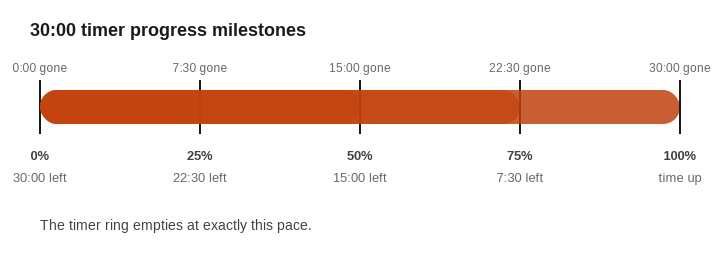
A quick progress check at the halfway mark keeps the round honest. If you are nowhere near done at 15:00, you know to cut the scope rather than run over.
What features does the 30 minute timer include?
On this page you get a full screen view, a choice of five alarm sounds, optional desktop notifications and a screen wake lock where the browser supports it. From the keyboard, Space starts and pauses, R resets, F opens full screen, + adds a minute and Esc stops the alarm.
When the countdown finishes, the sound plays for up to 60 seconds and the "Time's up!" banner appears. Pause at any point and resume from the same second; Reset takes the clock back to the original duration you set. If you run several rounds, a sticky note is the quickest way to track which task is which.
One limit to know: the alarm rings once, at zero, with no earlier warning. I add a halfway check by glancing at the ring, which is clear enough from a desk.
How long is 30 minutes in seconds and milliseconds?
Thirty minutes is 1,800 seconds, or 1,800,000 milliseconds, and exactly half of an hour. The timer measures every round against the browser's clock, so these numbers hold in practice.
| Unit | 30 minutes equals |
|---|---|
| Seconds | 1,800 |
| Milliseconds | 1,800,000 |
| Share of an hour | 50% |
| Two rounds | 1 hour |
| Three rounds plus two 10-minute breaks | 110 minutes |
The conversion behind the scenes uses a wall-clock reference: the end time is fixed when you press Start, so the countdown cannot slip by more than a fraction of a second. The last row is how I plan a morning: three rounds and two short breaks fill just under two hours, which leaves room for email before lunch.
How do you get the most out of a 30 minute session?
The most useful habit for a 30 minute session is deciding the single outcome before you press Start. Pick one demanding task, minimize every window you do not need, and set clear goals such as "finish the outline" rather than "work on the report."
Interruptions are the real enemy. Research quoted by several timer sites claims it takes 15 to 23 minutes to reach full focus on hard work, and that one interruption forces you to regain focus from scratch; I cannot trace that figure to a study, so treat it as a rough idea. Either way, silence distractions before the round: phone face down, notifications off.
The initial resistance fades fast once the countdown is visible. If it does not, I do the easy part first and save the core of the task for minute ten onward. The point is to avoid burnout from trying to force a perfect half hour every time.
What mistakes waste a 30 minute session?
The most common mistake with a 30 minute session is starting without a specific plan, which turns the round into distracted browsing. A close second is switching between tasks mid-round, because every switch costs you the warm-up you just paid for.
Rounds can be stacked, but only with gaps. A 10 to 15 minute break after each round works well, and after two or three cycles a longer pause of 30 to 45 minutes gives your head a proper reset. Skipping those gaps feels productive for an hour and then falls apart.
The other mistake is treating every task as a 30 minute task. Quick replies belong in a shorter block, and big creative work may need two rounds back to back with a one-minute stretch in between. Match the round to the job, not the other way around.
Which dishes fit a 30 minute kitchen timer?
Many weeknight dishes fit a 30 minute kitchen timer, especially those that cook unattended once they are in the pan or the oven. Casseroles that only need reheating, a tray of roast potatoes, or the second rise of a loaf during bread proofing all sit comfortably inside the half hour.
The timer is handy in a backgrounded browser tab while you read a recipe on another. Browsers slow hidden tabs down, but the end check does not drift, so the bell still rings on time.
For cooking I set the round to the lower end of the recipe's range and add a minute with +1 min if it needs longer. It is easier to extend a timer than to rescue a dish that went five minutes too long.
Is 30 minutes enough for yoga or meditation?
Yes, 30 minutes is enough for a complete home yoga practice or a long meditation sit. Many people structure the half hour as a short opening, a main sequence and a quiet finish, and the countdown removes the need to check a clock in the middle of a pose.
The biggest benefit I notice is consistency. A practice that fits into an existing routine, such as right after the morning coffee, is much easier to keep than one that waits for free time, and a fixed half hour makes the commitment feel small.
Tracking streaks on a calendar works well as a habit tool. If you follow a guided meditation, run the timer alongside it so you know when the session is meant to end. For a more intense workout on other days, the same 30 minute block applies, and doing it consistently matters more than any single session.
How do you make a daily 30 minute habit stick?
A daily 30 minute habit sticks best when it is tied to a fixed time and a fixed place, so the decision is made before the day begins. Set up a comfortable workspace or a yoga mat in the same spot, gather materials the night before, and write your intentions for the round on paper.
Build up gradually. Starting with shorter sessions and adding time when your energy allows prevents the too many sessions problem that breaks most new routines. Some guides suggest a ceiling of 4 to 6 study blocks, 3 to 4 work sessions or 2 to 3 workouts a day, starting lower while you adjust.
Use the half hour for jobs you keep postponing: household chores, journaling or language practice. A regular daily practice of anything gentle may help your mood, stress levels or sleep, but those effects vary from person to person, and the timer is just the structure.
How does the 30 minute timer keep accurate time?
Accuracy comes from the device clock: pressing Start records the finish time (now plus 30 minutes), and four times a second the page compares that finish time with the clock. The round lasts exactly the set duration, whatever else your computer is doing.
This method matters when the timer runs in a background tab. Hidden tabs are throttled by the browser, but the end check is not tied to animation, so the alarm rings on time. The remaining time also appears in the tab title, so you can check progress without switching tabs.
Because it reads the device clock directly, a busy computer or a skipped screen refresh cannot add or lose time during a workout, a lesson or a cook.
Need a different tool? Browse all timers & stopwatch.
Frequently asked questions
What happens to the 30 minute timer if I close the tab?
Closing the tab stops the 30 minute timer, because the countdown runs inside the open page. There is no session restore, so reopen the page and press the preset again if you close it by accident. For anything safety-dependent, or when the browser must be closed, use a dedicated device. Your sound choices are saved locally, and no private data goes to a server.
Is my timer data private?
Yes, the 30 minute timer keeps your settings in your browser's local storage and sends nothing anywhere. There is no running state to sync and nothing to restore on reopening: the countdown exists only while the page is open. Clearing your site data removes the saved sound and volume choices.
Why are so many meetings 30 minutes long?
Many meetings are 30 minutes long because Google Calendar and Outlook both offer 30 minutes as the default event length. Short formats such as weekly check-ins and agile retrospectives often run to that slot too. Putting a full-screen countdown on a laptop on the table keeps everyone aware of the time, and full screen makes the digits readable across a room.
Does the 30 minute timer work on a phone during meetings?
Yes, the 30 minute timer works on a phone during a meeting: open the page, press the preset and tap Full screen. The digits fill the display so a group can see them. A default 30 minute window is easier to respect when everyone can see the clock.
Can I set a halfway alert on the 30 minute timer?
No, the 30 minute timer has a single alarm at the end, with no interim alerts. A workaround I use is to run the 15 minute timer, restart it, and treat the first alarm as the halfway mark. That also works in the kitchen when a recipe suggests a check halfway through. For a longer first stage, the 25 minute timer gives a different split.
How much rest should follow a 30 minute session?
Rest about 10 to 15 minutes after a 30 minute work session, and take a proper physical break rather than a scroll. Skipping breaks tends to make the next round harder. Stand up, do a two-minute stretch, then refocus on the next task.
How many 30 minute rounds fit in a workday?
Most people do well with three or four focused 30 minute work sessions per day, plus whatever short tasks fill the gaps. Between rounds, walk, hydrate and breathe, and avoid screens if you can. For training, rest 2 to 3 minutes between workout sets. Exam review and note-taking can run more rounds, because they are lighter than original writing.
Can a 30 minute timer cover a full workout?
Yes, a 30 minute timer covers a solid workout if the session is well planned. A warm-up, a main practice of strength circuits or intervals, and a cool-down or relaxation pose fit inside the round. A hard session raises your heart rate, and many people say the endorphins afterward are reason enough to keep going. This is general information, not medical advice; check with a doctor before starting a new program.
Can I pause the 30 minute timer?
Yes, you can pause the 30 minute timer at any moment with Pause or the Space key, then resume from the same second. Pausing suits cooking and workouts, where a doorbell or a phone call should not cost you the round. During focused work, minimize pauses, because each one breaks the flow. For multi-stage cooking, finish your prep, then pause between stages and resume when the next pan is ready.
Does the 30 minute timer work on phones and tablets?
Yes, the 30 minute timer works on phones, tablets and computers with a modern browser, and it keeps the screen awake while it runs where the browser allows. The tab must stay open; a locked phone may pause background pages, so for a long cook a smart speaker or a phone clock app is a sensible backup, since closing the page stops the round.