How do I use a 1 minute timer for small tasks and daily routines?
A 1 minute timer is a countdown that rings after exactly 60 seconds, and here you start one by clicking the 1 min preset (or entering 0 hours, 1 minute, 0 seconds) and pressing Start. It is built for the small jobs that fill a day: a breathing pause, a tidy up, a pulse check or one step of a recipe.
On this page
- Which everyday tasks take exactly one minute?
- How to use the 1 minute timer
- How does the 1 minute timer keep accurate time?
- Does the 1 minute timer remember my settings?
- How long is one minute, really?
- Why does a one-minute task feel easier to start?
- How can a single minute train your focus and habits?
- What if one minute is a little too short or too long?
- What should a 1 minute timer screen look like?
Most people reach for a one-minute countdown when a task is too short to plan but too easy to let slide. Giving it a fixed minute turns a vague intention into a low-commitment, quick win with a clear finish line.
I keep a 1 minute timer open for the tiny routines around longer work: a stretch between calls, a minute of slow breathing before a presentation, a kitchen step that must not run over. The page needs no account and works the same on a phone or a desktop browser, with no app to install.
Which everyday tasks take exactly one minute?
Plenty of everyday tasks fit neatly into one minute, especially care rituals, kitchen steps and short mental resets. The value of the minute is that it is long enough to finish something real and short enough to start without hesitation, even on a busy day.
In the kitchen, a single minute covers searing one side of a thin cutlet or warming spices, though I always check the recipe rather than trusting a round number. Some cooks also use one-minute checks while tempering chocolate, stirring and testing between rounds.
A minute is also a common window for counting a resting heart rate: a healthy resting heart typically beats 60 to 100 times per minute, so you count pulses until the sound (general information, not medical advice). For the mind, one minute suits gratitude journaling, posture checks, breathing breaks and short breathing holds. Pair it with cooking steps or timed challenges for children and it becomes a repeatable ritual.
| Task | How the minute is used | When it helps most |
|---|---|---|
| Kitchen step | Brew, warm or sear for one timed minute | When a few extra seconds would overcook food |
| Breathing reset | Slow breaths until the sound plays | Before a call, exam or presentation |
| Room reset | Pick up as many items as you can | Messy desks, toy corners, quick cleanups |
| Review sprint | Read or recite one page of notes | Spaced practice between longer study blocks |
How to use the 1 minute timer
You use the 1 minute timer by choosing the 1 min preset or typing 1 into the minutes field, then pressing Start; the chosen sound plays at zero and a "Time's up!" banner appears. Everything happens in your browser, and your sound, volume and theme are remembered for your next visit.
- Click the 1 min preset, or type 0 hours, 1 minute and 0 seconds (a preset starts immediately).
- Choose Beep, Chime, Digital, Soft or Bell, then press Test sound.
- Press Start or the Space bar; press again to pause and resume.
- Press + (or the +1 min button) to add another minute, even mid-countdown.
- At zero, press Stop alarm or Esc, or Restart to run the same minute again.
Worked example: before a video call I set 0 h, 1 min, 0 s, picked the Soft sound at low volume and left Repeat when finished off. I breathed slowly until the sound, then pressed + once because I wanted a second minute. Result: two minutes of quiet in total, finishing on time even though I switched windows. For a three-step morning routine, turning Repeat on runs three one-minute blocks in about 3 minutes 6 seconds (3 × 60 s + 2 × 3 s gaps).
How does the 1 minute timer keep accurate time?
The 1 minute timer keeps accurate time by fixing the end moment as the start time plus the duration and comparing it with your device clock four times every second. Because it checks a fixed end point instead of counting ticks, a slow or busy tab cannot stretch the 60,000 milliseconds of a minute.
Browsers throttle animations in hidden tabs, but the end check keeps running, so the alarm fires on time while you work in another window. That is a real improvement on mental counting, which tends to drift when you are busy. The remaining time also sits in the tab title for a quick look.
This is the same browser clock your device uses for everything else, which is fine for daily tasks. For critical timing such as lab work or official competitions, use dedicated hardware instead. Where the browser supports it, the page also keeps the screen awake while the minute runs.
Does the 1 minute timer remember my settings?
Yes, the 1 minute timer remembers your sound, volume and theme in your browser's local storage, so the next minute starts the way you like it on reopening the page. That preference stays on your device and is never sent to a server, so the timer is private by design.
A running countdown is not kept if you close the tab; at zero the alarm rings for up to 60 seconds and then waits for you. I find that cleaner for one-minute tasks: either the minute finished or you start a new one.
The Copy link or Share button copies a link that reopens the same setting. Bookmark that link and the original duration is one tap away next time.
How long is one minute, really?
One minute is exactly 60 seconds, yet how long it feels depends almost entirely on what you do with it. Sitting still and watching the ring empty, a minute drags; answering a message, it vanishes before you finish the second sentence.
That gap between clock time and felt time is why a visible countdown helps. A day holds 1,440 minutes, and a single one-minute ritual repeated daily adds up to 365 minutes across a year, or just over six of the 60-minute blocks on your calendar.
I treat that figure as a reminder that small routines are cheap individually and large in total. One minute of stretching, reading or breathing each morning is easy to defend, and the yearly sum shows why it is worth protecting.
Why does a one-minute task feel easier to start?
A one-minute task feels easier to start because the commitment is so small that resistance has nothing to push against; you only promise yourself 60 seconds. In my own routine, the hardest part of tidying a desk or answering a message is the first move, and a minute removes the excuse.
That tiny-promise framing works for habits, flashcard reviews, chores, homework starts or focused reading: one page, one card set, one paragraph. Often the minute ends and you simply keep going, which is the real goal.
The same logic helps with quick decisions. Giving yourself one minute to choose a lunch, a reply or a board-game move stops a small choice from eating ten. Stress relief works similarly: one minute of deep-breathing is a reset you can actually fit in. These are personal observations, not research findings.
How can a single minute train your focus and habits?
A single minute trains focus and habits by giving you a repeatable, measurable block you can practise daily without needing motivation. Short creative sprints and reaction-time games show how much attention you can hold for one minute, and in my experience that number improves with practice.
A minute is the right size for meetings too: one quiet minute to read the agenda, or a moment of silence before a team starts. Teachers use one-minute blocks in classroom activities to settle a group, trainers use them for warm-up intervals, therapists for short reflection exercises, and a child understands "until the sound" far better than "in a bit".
Care routines are another training ground. Brushing teeth, hand washing, applying face masks or doing desk stretches for a timed minute makes the habit consistent. Even steeping green tea or reheating leftovers becomes more predictable when the minute is measured, and timed speeches practice teaches you how much fits in 60 seconds.
What if one minute is a little too short or too long?
If one minute is a little off for your task, change the seconds field or add a minute with the +1 min button instead of looking for a different page. For example, enter 0 min 50 s for a shorter step, or 1 min 10 s when you need a bit longer.
The seconds field accepts 0 to 59, so anything past 59 must go in the minutes field. Need a whole extra minute mid-task? Press + while it runs and the countdown simply grows.
I use this a lot for aromatics in a pan and for toasting seeds, where 60 seconds is a starting point rather than a rule. Blanching vegetables is another case: thin greens need less than a minute, thicker pieces more, so adjust from the recipe. For boiled eggs the egg timer has doneness presets, for exactly sixty seconds the 60 second timer is the same countdown, and for a longer break the 5 minute timer is one click away.
What should a 1 minute timer screen look like?
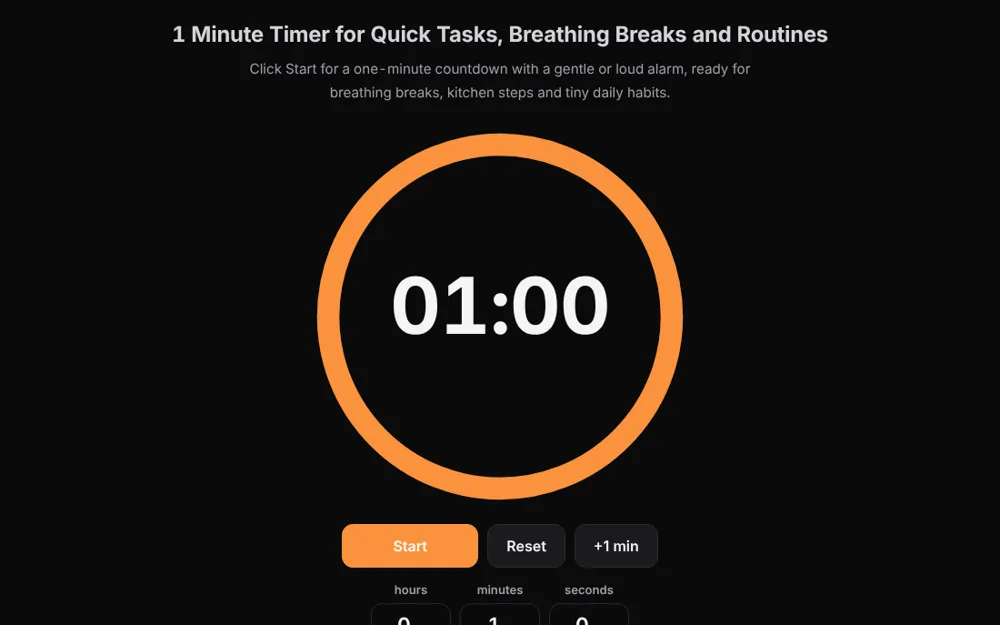
A 1 minute timer screen should show large digital numbers, a progress ring and almost nothing else, so you can read it from across a room in a second. Extra buttons only get in the way when all you need is the time left.
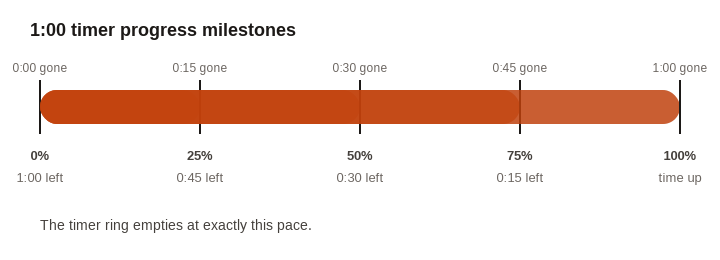
The ring is the part I rely on most. It empties as the minute passes, which is easier to read at a glance than numbers when you are mid-task or lying on the floor for a stretch. Full screen mode (press F) enlarges the countdown on a phone, tablet or monitor.
If you prefer a dark background in a dim room, use the theme button in the site header and the page remembers your choice. The tool runs on any device with a modern browser and no download, so it gives the same structure to study breaks or quick tasks wherever you are. One versatile page covers a single minute or a custom length, and the sound is your alert when time is up.
Need a different tool? Browse all timers & stopwatch.
Frequently asked questions
What is a good everyday use for a 1 minute timer?
A good everyday use for a 1 minute timer is any small task you keep postponing, such as clearing a desk, sending a quick message or holding one stretch. It also suits a fair answer round at the dinner table. If the task takes longer than a minute, you have at least started it.
Why not just count to 60 in my head?
Counting to 60 in your head is less dependable than a timer because your pace changes with effort, boredom and distraction. A visible countdown keeps pauses honest and frees your attention for the task itself. It also ends at the same moment for everyone in the room.
Is the 1 minute timer precise enough for recipes and quizzes?
Yes, the 1 minute timer is precise enough for recipes, quizzes and routines, because it checks a fixed end time against your device clock several times a second. Any delay is tiny compared with the minute itself. Keep the volume up so you hear the alarm over kitchen noise.
What happens if I close the tab during a one-minute countdown?
If you close the tab during a one-minute countdown, the countdown stops, but your sound, volume and theme stay saved in the browser. Open the page again and you can restart immediately with one click. For a minute-long task, starting over costs you very little.
Does the 1 minute timer send my data anywhere?
No, the 1 minute timer does not send your data anywhere, because it runs entirely in your browser with no sign-up. After the first load, the countdown never contacts a server. Nothing is stored about your countdowns.
Will a 1 minute timer still ring in a background tab?
Yes, the 1 minute timer still rings in a background tab, because the end check keeps running even when the browser slows animations. Keep the tab open and the device awake, and allow desktop notifications. On phones, leaving the timer in front is the safest choice.
Can I use the 1 minute timer without internet?
The 1 minute timer needs a connection to load, and I have not tested it fully offline, so treat offline use as unconfirmed. For a reliable result, load the page while you are online and keep that tab active rather than reloading it without a signal.
Can I run a 1 minute timer for a whole group?
Yes, you can run a 1 minute timer for a whole group by switching to full screen and choosing a loud sound. A one-minute block works for transitions, a warm-up or a short reflection. Repeat when finished keeps several rounds flowing without anyone touching the keyboard.
Is a browser 1 minute timer better than my phone's timer?
A browser 1 minute timer is not always better than your phone's timer, but it shows a big, readable countdown on a laptop or projector with nothing to install. A phone is handier in the kitchen. Use whichever you can see and hear clearly from where you are working.
Is a 1 minute timer useful for children?
Yes, a 1 minute timer is useful for children, because one minute is a goal a young child can see and finish. Try "pick up toys until the sound" as a cleanup game. The progress ring helps children who cannot read clock times yet.
Can I run several one-minute rounds in a row?
Yes, you can run several one-minute rounds in a row by ticking Repeat when finished, which restarts the timer about 3 seconds after each alarm. You can also press Restart on the banner by hand. Use 50 seconds or 70 seconds (entered as 1 minute 10 seconds) when a round needs to be slightly shorter or longer.
Is the 1 minute timer readable on a tablet or laptop?
Yes, the 1 minute timer is readable on tablets, laptops and larger screens, because full screen mode scales the digits and ring to fit the display. The theme button in the header switches between light and dark mode. For a silent visual timer, drag the volume slider to zero. That makes it handy for timed challenges, cooking steps, max reps practice, math sprints, speed reading drills or cognitive games.