How do I set a 60 second timer?
A 60 second timer counts down exactly one minute and rings at zero: on this page you enter 1 minute and 0 seconds (or tap the 1 min preset), press the Start button, and your chosen sound plays when the minute is up. Because one minute equals 60 seconds, the display runs from 1:00 to 0:00.
On this page
- What exactly does a 60 second timer measure?
- Which drills, games and speaking rounds fit into 60 seconds?
- Why is a minute split into sixty parts?
- How do I stack 60-second rounds into an interval workout?
- How to use the 60 second timer
- How does the 60 second timer keep accurate time?
- Which settings can I change for a 60-second round?
- Why does a hard 60-second cap change the way you speak?
I use a 60-second block mostly as a drill clock rather than a kitchen timer. It is the length of a plank set, a speech answer, a game round or a sales pitch, and it is short enough that nobody loses track of where they are.
One detail trips people up: the seconds field only accepts 0 to 59, so typing "60" into it gives a friendly error. Put the 60 seconds in as 1 minute instead. The page then works as a digital tool that gives a clear signal the moment the round ends, with five sounds to choose from.
What exactly does a 60 second timer measure?
A 60 second timer measures one fixed interval of 60 seconds, from the press of Start to the final alarm, and nothing else. That narrow job is the point: you get a countdown with large digits and a progress ring that empties as the minute passes.
The ring matters more than people expect. A coach across a sports hall or a speaker at a lectern can read it at a glance, without decoding numbers, and the shrinking arc tells you whether you are at the halfway mark or the last few seconds.
The 60 seconds themselves come from the base-60 counting habit we still use on every clock face, so the duration never needs converting. At the end, the alarm sounds, a "Time's up!" banner appears, and you can restart the same minute with one click.
Which drills, games and speaking rounds fit into 60 seconds?
A 60-second round suits any activity that is quick, repeatable and judged by how much you fit inside a strict time window: exercise drills, party and classroom games, and short speaking turns. Short tasks like these feel manageable because the end is always in sight, and that built-in urgency keeps people moving.
For training, think in drills rather than workouts. Gyms use the minute for single movements, a teacher in schools can run a "say three facts" round, and in workplaces a stand-up meeting can give each person one minute. The same versatile block also works for stretching between long seated sessions.
Speaking is where the minute is most flexible. A one-minute answer forces you to lead with the point, cut the second example and stop. For a small focused task, such as summarising a page aloud, I find 60 seconds is tight enough to sharpen you and long enough to finish. Pacing rounds this way also keeps heart rate and running pace drills honest when you train alone.
| Activity type | What one 60-second round looks like | Why 60 seconds works |
|---|---|---|
| Strength drill | Max push-ups, one front hold or one squat hold against a wall | Long enough to fatigue, short enough to keep form |
| Party or classroom game | One player's turn to answer, draw or guess | Every turn gets exactly the same time |
| Speaking practice | One answer, one pitch or one rebuttal | Forces a single clear point |
| Reset break | Stand up, roll shoulders, slow exhales | Fits between tasks without breaking focus |
Why is a minute split into sixty parts?
A minute is split into sixty parts because our timekeeping inherited a sexagesimal (sixty-based) number system, and that is why a sixty-second countdown and a one-minute countdown are the same length. The split into 60 parts long predates the clock faces that made it visible to everyone.
Measuring time that precisely was not normal for most of the past. People in kitchens judged cooking by eye, and a speaker's presentation ended when the audience lost patience, not when a clock said so.
Today a student in school debates gets the same sixty-second slot as everyone else, measured to the second. That fairness is something only accurate minute-level timing made possible, and a browser timer now gives it to anyone for free.
How do I stack 60-second rounds into an interval workout?
You build an interval workout by repeating the 60 second timer back to back, turning on Repeat when finished so each minute restarts on its own about 3 seconds after the alarm. That small gap is useful: it is your cue to switch from one exercise to the next.
A typical high-intensity circuit might rotate burpees, mountain climbers, high knees, jump rope and a plank, one minute each. Another option is exercise intervals that alternate hard effort with rest periods, such as a sprint minute followed by a walking minute, or heavy sets of a push-up variation followed by wall sits.
The totals below assume Repeat when finished is on, so every restart adds roughly 3 seconds. Plan 8 to 10 rounds for a short session and allow a proper recovery minute whenever your form slips. If you want longer work blocks, the 5 minute timer follows the same steps, and for a group in school the classroom timer uses the same countdown.
| Format | How each minute is used | Runs of the timer | Approximate total clock time |
|---|---|---|---|
| Every minute on the minute | Do the set, rest for what is left of the minute | 10 | 10 min 27 s (10 × 60 s + 9 × 3 s) |
| 60 on / 60 off | Work one minute, rest one minute, 5 work blocks | 10 | 10 min 27 s |
| Station circuit | 6 stations, 2 laps, one minute per station | 12 | 12 min 33 s (12 × 60 s + 11 × 3 s) |
| Speed-round quiz | One question set per minute | 8 | 8 min 21 s (8 × 60 s + 7 × 3 s) |
How to use the 60 second timer
You use the 60 second timer by setting 1 minute and 0 seconds, pressing Start, and letting the chosen sound tell you the minute is over. Everything runs in your browser, so there is nothing to install. You can control it with the mouse or with keyboard shortcuts, which helps when your hands are busy mid-drill.
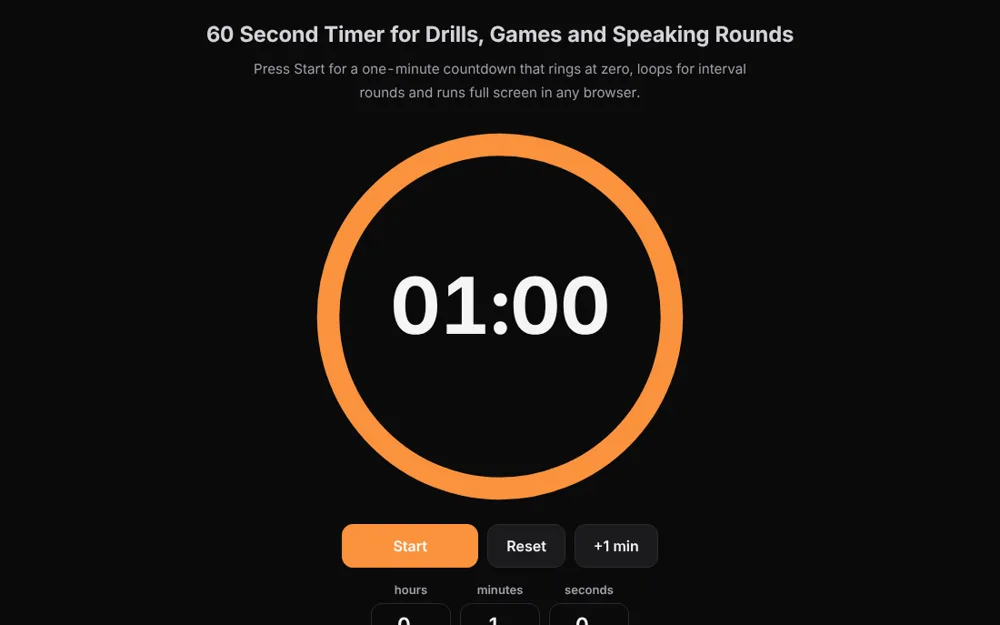
- Enter 0 hours, 1 minute and 0 seconds, or click the 1 min button (it starts at once).
- Pick one of the five sounds (Beep, Chime, Digital, Soft or Bell), set the volume and press Test sound.
- Press Start or the Space bar; press it again to pause, and once more to resume.
- Press F for fullscreen, + to add a minute, R to start over and Esc to stop the alarm.
- When the "Time's up!" banner appears, press Stop alarm, or restart the same minute.
Worked example: for a speaking drill with six people, I set 0 h, 1 min, 0 s, chose the Bell sound and turned on Repeat when finished. Each participant spoke until the bell, and the timer restarted itself about 3 seconds later for the next speaker. Result: six speed rounds in about 6 minutes 15 seconds (6 × 60 s + 5 × 3 s), with no one touching the keyboard. If you allow desktop notifications, an alert also appears when the page is behind other windows.
How does the 60 second timer keep accurate time?
The 60 second timer stays accurate because it fixes the end moment as start time plus duration and checks that moment against your device clock four times a second. It does not count down by adding up ticks, so a busy page or a background browser tab cannot make the minute run long.
Browsers slow down animations in hidden tabs, but the end check keeps running, so the alarm still fires on time. The remaining time also shows in the tab title, which lets you notice it while another window is in front.
On mobile phones and tablets, modern browsers that support the Screen Wake Lock API keep the screen awake while the timer runs. Accurate minutes are a newer luxury than they seem: the mechanical clock only gained minute hands around the 16th century, and for most of history a minute was a guess. Nothing is sent to a server; I have not tested the timer fully offline, so load the page while you still have a connection.
Which settings can I change for a 60-second round?
You can change the length, the alert tone, the volume and whether the round repeats, and the page remembers your tone and volume the next time you visit. If you need something other than a clean minute, type a custom time such as 0 min 45 s for a shorter drill.
Most settings are about getting the cue right. A soft tone suits a quiet classroom, while a loud digital one cuts through gym music. The ring simply empties as the minute passes, which I find less distracting than a flashing display.
Reset puts the timer back to your last setting, so a coach reruns the same minute with one tap of R. The Space key starts and pauses, so you rarely need the mouse at all.
Why does a hard 60-second cap change the way you speak?
A hard 60-second cap changes how you speak because it removes the option to warm up slowly; you have to state the point first and cut everything that does not support it. In my experience that single constraint does more for clarity than any list of speaking tips.
That is why elevator pitches, a sales pitch contest and lightning rounds at events often use one minute. The same logic works for typing tests, timed drawing and a quiz turn: every game turn ends at the same moment, so results are comparable.
Short blocks also respect attention spans. A one-minute breathing pause or a mindfulness check-in between meetings fits into transitions as one of several microbreaks and timeboxing a decision to 60 seconds stops you from overthinking a small choice. These are personal observations rather than research findings.
Need a different tool? Browse all timers & stopwatch.
Frequently asked questions
Is a 60 second timer the same as a 1 minute timer?
Yes, a 60 second timer and a 1 minute timer run for the same length, because one minute is exactly 60 seconds. The habit of dividing by 60 is traced to the Sumerians, who used base-60 in math and astronomy. Earlier cultures read time from the sun and moon instead, without any clock at all.
Can the 60 second timer repeat on its own?
Yes, the 60 second timer repeats when you tick Repeat when finished, which restarts the minute about 3 seconds after each alarm. There is no round counter, so count sets yourself. That simple repeat is enough for EMOM work or circuit training, though a strict Tabata session needs shorter blocks than 60 seconds.
Will the 60 second timer work on my phone?
Yes, the 60 second timer works on phones, tablets and computers, so it runs on all devices with a current browser. It is fully browser-based with no sign-up or download. Keep the tab in front, and if your phone does not support the wake lock, raise the auto-lock time in its settings.
What happens on screen when the 60 seconds run out?
When the 60 seconds run out, the chosen sound rings for up to 60 seconds and a "Time's up!" banner shows Stop alarm and Restart buttons. The tab title also changes, so you see the end even in another window.
How can I tell how much of the minute is left without reading numbers?
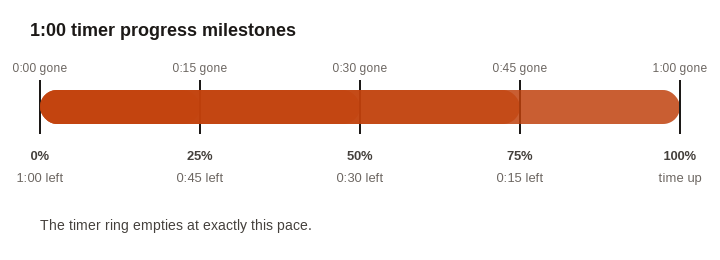
You can tell how much of the minute is left by watching the ring around the time, which empties as the 60 seconds pass. At the halfway point the ring is half gone, and near the end only a thin sliver remains. In fullscreen the ring and digits fill the display, which helps from across a room.
What can I realistically get done in 60 seconds?
In 60 seconds you can realistically finish one small physical or mental task: a plank, a tidy desk surface, a page of flashcard review, or a one-line reply. Work that needs memory recall or quick decisions suits the minute well. Anything with several steps usually needs a longer timer.
Is a 60 second timer good for exercise sets?
Yes, a 60 second timer suits exercise sets because one minute is a common work or rest block for bodyweight moves. Nothing starts by itself, so press Start or turn on Repeat when finished. Use fullscreen and a loud sound so you can follow it from the floor without your phone in hand.
Can I pick a different alarm tone?
Yes, you can pick any of the five built-in tones listed in the steps above. There is one volume slider and a Test sound button, and the page remembers your sound and volume for next time.
Can I stop a 60-second round mid-way and continue it?
Yes, you can pause a 60-second round with the Space bar or the main button and continue from the exact second you stopped. Pausing is handy when a drill is interrupted mid-set. Press R to reset the full minute instead if you want a fresh start.
Why use 60 seconds instead of a longer block?
Sixty seconds works better than a longer block when the task is meant to be intense or comparable between people. In my experience, most people can hold full effort or full focus for one minute without much stress, and every player gets an identical slot. For study or deep work, a longer timer is the better tool.
How many 60-second rounds should I run in one session?
For most drills, plan 8 to 10 rounds of 60 seconds in one session, which takes about 8 to 10 minutes plus short gaps. Track the sessions you complete, add rest whenever form or focus drops, and stop earlier if a movement hurts. Beginners can start with four or five rounds and build up.