How do I set an alarm for 6 AM?
This page opens with 6:00 AM already selected, so you only choose a sound, press Set alarm and keep the tab open on an awake, unmuted computer; it rings at 6:00 AM today if six hasn't passed yet, otherwise tomorrow.
On this page
- How to use the 6 AM alarm clock
- What happens at 6:00 AM when the alarm rings?
- What time should you go to bed to wake up at 6 AM?
- How much sleep does each bedtime give you before 6 AM?
- How do you make a 6 AM wake-up stick through the week?
- What if you sleep through a 6 AM browser alarm?
- How does the 6 AM alarm keep accurate time?
A 6 AM alarm usually means something specific: a gym session before work, an early shift, a first train or a quiet hour before the house wakes up. The tool is free, runs in the browser and shows a live countdown once the alarm is set, so you can see at a glance how long remains until the clock time arrives.
The catch with early alarms is the half-asleep Stop press, and the real fix is the bedtime the night before. The sections below cover setup, the bedtimes that line up with 6:00, and the habits that keep a six o'clock start from falling apart by Thursday.
How to use the 6 AM alarm clock
The 6 AM alarm clock is preset: the hour and minute pickers arrive pre-filled with 6:00 AM, so setting it takes three clicks, with no app to install. You can still customize everything before you confirm.
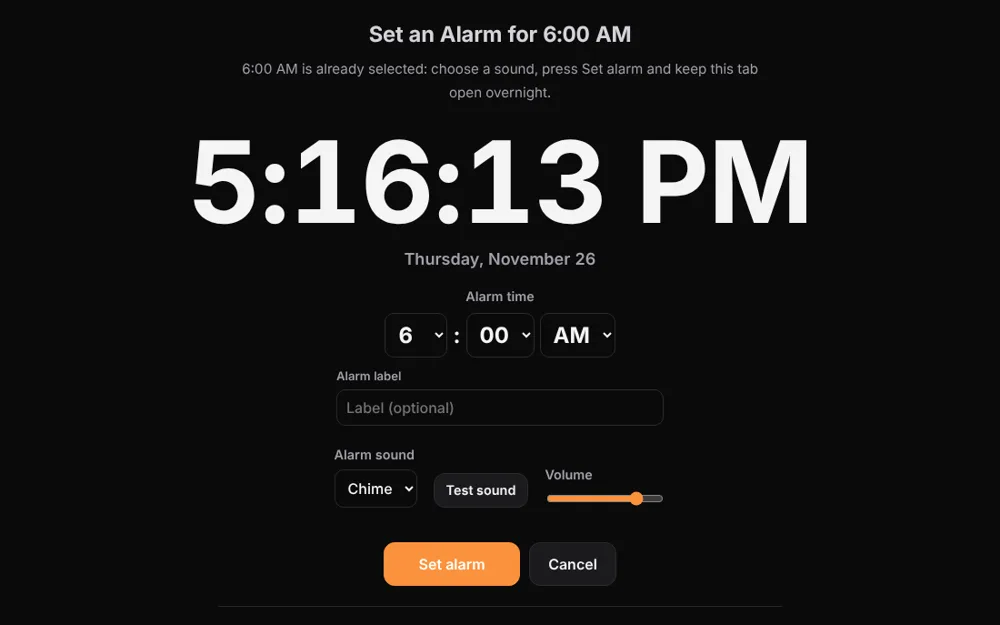
- Check the time. The pickers show 6:00 AM; change the minute if you want 5:45 or 6:15.
- Add a label. Optional, but a short message like "Early train" or "Gym" tells you instantly why you set it.
- Pick a sound. Choose Beep, Chime, Digital, Soft or Bell, adjust the volume and press Test sound.
- Press Set alarm. One click confirms it, and the status line and countdown appear.
Worked example: at 9:30 PM I leave the time at 6:00 AM, type the label "Early train", pick the Bell sound at about 70% volume and press Set alarm. The status line reads "Alarm set for 6:00 AM" with tomorrow's weekday in brackets, and the countdown shows Rings in 08:30:00. If you open the page at 5:30 AM, the same steps give an alarm later today in 30 minutes; once six has passed, it moves to the next day, which means tomorrow morning.
What happens at 6:00 AM when the alarm rings?
At 6:00 AM the chosen sound starts and repeats for up to 10 minutes, with two buttons on screen: Stop alarm and Snooze 5 min. On the keyboard, Esc stops the alarm and S snoozes it.
Before it rings, the active alarm stays visible as a status line and a time remaining countdown, and the browser tab title shows the alarm time with a clock icon, so a quick glance from bed tells you whether to bother going back to sleep. Pressing Stop alarm cancels that alarm completely.
Snooze pushes it back exactly 5 minutes. For a 6 AM start, two snoozes already turn it into 6:10, so I treat Snooze as a one-time buffer and keep the Stop button as the real off switch.
What time should you go to bed to wake up at 6 AM?
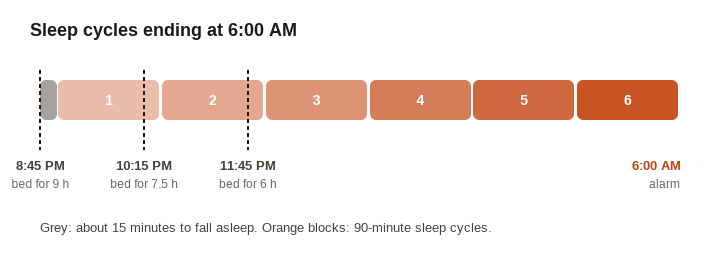
To wake up at 6 AM at the end of a sleep cycle, go to bed at about 8:45 PM, 10:15 PM or 11:45 PM; those times allow for 6, 5 or 4 cycles of about 90 minutes plus roughly 15 minutes to drift off. The sleep planner under the tool shows the same three times for a 6:00 AM alarm.
| Cycles | Sleep time | Bedtime for 6:00 AM |
|---|---|---|
| 6 | 9 hours | 8:45 PM |
| 5 | 7.5 hours | 10:15 PM |
| 4 | 6 hours | 11:45 PM |
The middle row is a realistic target for many early risers. A bedtime anywhere between about 9:45 and 10:15 PM still lands in the range that the National Institute of Neurological Disorders and Stroke gives for most adults: 7 to 9 hours a night.
In plain clock terms, a 9:00 PM bedtime gives about 8h 45m, 10:00 PM gives 7h 45m, 11:30 PM gives 6h 15m and midnight only 5h 45m; real numbers vary with how quickly you drop off. Read the times as a planning aid rather than medical advice.
How much sleep does each bedtime give you before 6 AM?
Each bedtime before a 6 AM alarm gives you the hours until six minus the time it takes to fall asleep; with about 15 minutes allowed, a 10:45 PM bedtime gives roughly 7 hours. That arithmetic matters more than sleep cycles on nights when you simply get to bed late.
Run the same sum for other bedtimes: 9:30 PM leaves about 8 hours 15 minutes and 12:30 AM only 5 hours 15 minutes. Going to bed at 1:15 AM leaves 4.5 hours, an emergency plan at best, while 11:45 PM is workable now and then. Anything under 7 hours is short of the 7 to 9 hours suggested for adults, and 7 to 9 hours is a range, not a target to squeeze into the bottom of.
These sums are where a 6 AM routine either works or quietly fails. If your evenings regularly run to 11:30 PM, a 6:00 alarm is a 6-hour night, and an alarm time an hour later may be the honest fix, and the set alarm for 7 am page shows the matching bedtimes.
How do you make a 6 AM wake-up stick through the week?
A 6 AM wake-up sticks when the alarm time stays the same on most days and the morning plan is decided the evening before. Early alarms fail less from the alarm itself than from drift: a 10:30 PM bedtime on Monday becomes 11:00 PM by Wednesday.
- Fix the bedtime first. Pick one of the planner's starting points and set a reminder for winding down 30 minutes earlier.
- Lay out the first task. Gym bag by the door, meeting notes open, or the school pickup bag packed, so the first five minutes need no decisions.
- Set the alarm before you relax. Open this page, check the sound and activate the alarm while you are still alert.
Teenagers sharing the house need more sleep than adults (8 to 10 hours, against 7 to 9), which is worth remembering if one 6 AM alarm in the hallway wakes everyone. A late lie-in on Saturday is fine; letting it stretch by two or three hours is what makes Monday's 6:00 feel brutal.
What if you sleep through a 6 AM browser alarm?
If you sleep through a 6 AM browser alarm, the usual causes are a quiet speaker, a computer that went to sleep, or a Stop press you don't remember. Each one has a simple fix that you can test the night before.
Laptop speakers are small, so keep the volume up and the system unmuted, and keep the screen on or dimmed rather than sleeping; the tool asks the browser to keep the screen awake while the alarm is set, where supported. Put the laptop across the room so getting up is part of stopping the sound.
Consistency helps here too: keeping weekend wake-ups within an hour of 6:00 stops your body clock from shifting, so the alarm isn't fighting deep sleep on Monday. For mornings that really matter, such as an early flight, pair this page with a dedicated app on your phone set five minutes later. Two alarms on two devices cost nothing and remove the single point of failure.
How does the 6 AM alarm keep accurate time?
The 6 AM alarm keeps accurate time by reading your device clock (the computer's system time), so it rings when that clock reaches 6:00:00 and is as accurate as the device it runs on. The countdown is just the gap between the alarm moment and now.
The bedtimes come from a fixed method: the planner counts back 6 cycles, 5 cycles and 4 cycles of 90 minutes from the alarm (9, 7.5 and 6 hours) and adds about 15 minutes to fall asleep. Change the alarm minute and the planner moves with it, so a 6:15 alarm shows 9:00 PM, 10:30 PM and midnight.
If the clock above looks wrong, turn on automatic date and time in your device settings and reload before setting the alarm. That one check also catches a laptop still set to another time zone after a trip. For any other time of day, the online alarm clock lets you pick the hour and minute yourself.
Need a different tool? Browse all alarm clocks.
Bedtime suggestions are general guidance based on average 90-minute sleep cycles, not medical advice. Talk to a doctor about ongoing sleep problems.
Frequently asked questions
What is 6 AM in 24-hour time?
6 AM in 24-hour time is 06:00. If your device uses the 24-hour format, the alarm picker shows 06:00 with no AM/PM choice, and the alarm rings at the same moment either way. Evening bedtimes convert the same way, so 10:15 PM appears as 22:15.
Can I set the alarm tonight for 6 AM tomorrow?
Yes, you can set the alarm tonight for 6 AM tomorrow: once 6:00 AM has already passed today, the tool automatically schedules it for the following morning. The status line names the weekday, so you can confirm it before bed. Leave the computer awake and the tab open overnight; a 9:15 PM setup shows a countdown of 08:45:00.
Can I set 5:45 or 6:15 instead of 6:00?
Yes, change the minute picker before you press Set alarm and the page sets 5:45, 6:15 or any other minute. To edit a choice, update the picker first; whether your browser draws the pickers as dropdowns or wheels, the result is the same. The sleep planner updates with the new time, and the label and sound stay as you chose them. A 5:45 alarm, for instance, gives bedtimes of 8:30 PM, 10:00 PM and 11:30 PM.
Will the 6 AM alarm ring if I close the tab or my computer sleeps?
No, the 6 AM alarm will not ring if you close the tab or the computer goes into sleep mode, because the page itself does the timing. Switching tabs or minimizing the window is fine. Keep the laptop plugged in, set its sleep timer to never, and keep it awake until morning.
Why can't I hear the alarm sound?
You usually can't hear the alarm sound because the computer is muted or too quiet, the audio goes to the wrong output device, or the browser has not yet had permission to play audio. Browsers allow sound after you interact with the page, and pressing Set alarm or Test sound counts. If you tested it with the Test sound preview beside the sound menu and still hear nothing, check headphones and system volume.
The on-screen banner with Stop alarm still appears, but a silent alarm is easy to dismiss in your sleep.
How long is the snooze on the 6 AM alarm?
The snooze lasts 5 minutes, and that default length is fixed. Some alarm sites use 9 minutes; a shorter snooze keeps a 6:00 start from sliding to 6:30 without you noticing. Press Snooze 5 min or the S key, and the alarm rings again with the same label and sound, for up to 10 minutes unless you stop it.
Can a browser alarm be my only wake-up call at 6 AM?
A browser alarm is enough for naps, desk reminders and nights when the computer stays on, but it is risky as your only main morning alarm for something you cannot miss. The page depends on an open tab, an awake computer and working speakers. Keep the laptop charged or plugged in, and back it up with a second alarm on another device.
Can I use the 6 AM alarm on a phone or tablet?
Yes, the 6 AM alarm opens in a mobile browser on a phone or tablet, but the screen must stay on and unlocked, and the tab must stay in front. Phones pause background pages to save battery, so the built-in clock app is the safer choice for an early start; this page works best on a laptop or desktop.
Is this a 6 AM alarm or a timer?
This page is an alarm: it rings at a clock time, 6:00 AM, rather than after a fixed duration. A timer counts down a length of time, such as 45 minutes. The countdown shown here is just information about how long remains until six.
Is the 6 AM alarm free?
Yes, the 6 AM alarm is free and needs no sign-up. It gives you a reliable alarm, a choice of five sounds and the bedtime planner.
Are my alarm settings saved?
Yes, your settings for sound and volume are saved in browser storage on your device and nothing goes to a server. They return after a refresh or when the page is reopened, and clearing site data or local storage removes them. Keep the tab open in the background if you want the last alarm you set to ring, because the alarm runs only while its page is open. Browsers need an internet connection only to load the page.